
Transformation · New
Prada AI Video Generator
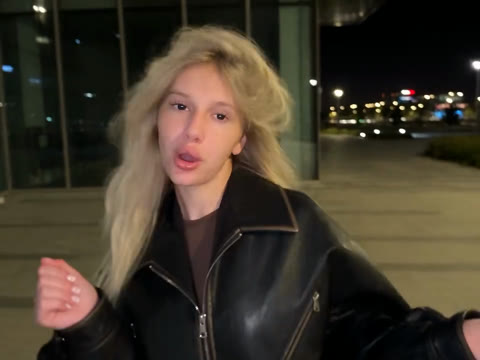
Turn one front-facing portrait into a 15-second 720p Prada AI transition with synced audio. Starts indoors with devil-horn gestures, squeezes behind white panels, and cuts to a windy night street in an oversized black leather jacket. 400 credits.
Prada AI · 15s · 4:3
15s · 4:3 · 720p · original sound · ready in a few minutes
Example
See the 15-second Prada transition in action
One front portrait drives both halves of the clip: the warm indoor opening, the twin white panel squeeze, and the windy night-street leather jacket reveal.
Prada AI indoor-to-night transition
15 seconds at 4:3 with the original synced audio track: casual indoor t-shirt and horn gestures cut straight to an oversized black leather jacket under city streetlights.
Same category
More Transformation templates
 NEW300 CR
 NEW140 CR
 NEW350 CR
 NEW140 CR
 NEW220 CR
 NEW400 CR
 NEW220 CR
 NEW140 CR
 NEW270 CR
 NEW190 CR
 NEW270 CR
 NEW140 CR
The beats
How the 15-second Prada AI clip unfolds
The template follows the exact three-part rhythm of the viral transition so the outfit swap lands right on the beat drop.
0–5s · Casual indoor opening
Your subject appears in a warmly lit room wearing a simple casual t-shirt. They tilt their head to the rhythm, raise two fingers beside their forehead in playful horn gestures, and lip-sync directly to the camera.
5–9.25s · Twin white panel squeeze
As the build-up hits, your subject holds both hands out to the sides while two bright white vertical panels slide inward from both edges of the frame, pause briefly in the center, and snap shut right before the drop.
9.25–15s · Windy night-street leather jacket reveal
On the beat drop, the scene hard-cuts to an open city plaza at night lit by glass storefronts and streetlamps. Your subject wears an oversized black leather jacket with hair swept by the night breeze while finishing the lip-sync.
Photo tips
Photos that keep the transition sharp
A single clean, front-facing portrait gives the model clear facial structure and hair detail to carry into both the indoor room and the windy night street.
- Upload a sharp, chest-up front-facing portrait with your face centered and eyes looking toward the camera.
- Use even indoor or daylight lighting so facial contours, eye color, and natural skin tone stay consistent across the night-street cut.
- Keep your hair visible and uncovered so the windblown motion in the leather jacket reveal looks natural.
- Upload a JPG, PNG, or WebP photo up to 20 MB with a calm background and one person clearly in frame.
Who to put in
Great portraits for the Prada leather glow-up
Because the template builds the casual t-shirt, the white panel transition, and the oversized leather jacket automatically, almost any clear solo portrait works.
Everyday selfies without filming two takes
Turn one everyday selfie into the full two-location night reveal with indoor lighting, transition panels, and an oversized leather jacket generated automatically.
Deadpan contrast portraits
Serious, understated, or ultra-casual portraits create hilarious contrast when the beat drops into dramatic windblown hair and high-fashion street lighting.
Cosplay and original characters
Drop stylized portraits, painted characters, or cosplay looks into the transition to see them shift from a cozy room into a cinematic midnight city plaza.
Birthday and friend shout-outs
Use a consenting friend’s favorite portrait to turn a normal camera-roll snapshot into a 15-second main-character night edit.
Photos: JPG, PNG, WebP, up to 20 MB.
Ready to post
Captions and hashtags used with this trend
Copy a short caption or pair your clip with the tags creators use when sharing the Prada transition.
- “Prada trend #pradatrend #devilwearsprada #aitransition”
- “Wait for the white doors to close #pradapradaprada #leatherjacket”
- “One photo, zero wardrobe changes #pradaai #outfittransition”
- “From bedroom tee to midnight plaza in 15 seconds #prada #glowup”
- Exported clips arrive in crisp 4:3 at 720p with the synced audio track already muxed in, ready to upload straight to short-form feeds.
- Post with a short hook about waiting for the nine-second panel drop so viewers watch all the way through the night-street reveal.
Ideas
Fun ways to frame your Prada AI clip
Once your 15-second MP4 finishes rendering, a few simple posting angles help the transformation stand out.
Side-by-side with your original photo
Place your static input portrait next to the final windy leather-jacket frame in a carousel or duet so followers can see how much came from one image.
Unexpected subject reveal
Open with a sleepy, cozy, or studious portrait so the sudden cut to oversized leather and blowing hair hits with maximum comedic contrast.
Matching night-out outfit check
Pair the AI clip with your real-life leather jacket look for a back-to-back comparison edit.
Origin
Where the Prada AI transition comes from
The trend pairs a viral Russian-to-English remix with a signature white-panel squeeze cut.
From viral TikTok mashup to one-photo AI template
The "Devil Wears Prada" / "Prada Prada Prada" transition grew out of KANA DJ’s September 22, 2026 TikTok mashup blending Kai Angel’s track "andy warhol" with Jakarta’s "One Desire", popularized in October 2026 by creators such as @kareyka11 and covered by Metaratings.
Creators initially filmed two separate takes—an indoor casual lip-sync and an outdoor night-street leather jacket reveal—before one-photo AI templates automated the entire 15-second sequence.
FAQ
Prada AI FAQ
How many photos do I need for the Prada AI template?
Just one clear, front-facing chest-up portrait of a single person. The generator builds both the casual indoor t-shirt scene and the outdoor night-street leather jacket reveal from that single photo.
Do I need to wear a black leather jacket in my photo?
You can wear anything you like in your photo. The model automatically dresses your subject in a casual dark tee for the indoor opening and switches them into an oversized black leather jacket for the night-street reveal.
What video format, duration, and resolution do I get?
Each run outputs a 15-second MP4 at 720p in 4:3 aspect ratio with the synced trend audio track already muxed in, matching the classic framing of the viral transition.
How many credits does one generation cost?
One 15-second 720p generation costs 400 credits. If a job fails to complete, your credits are automatically refunded.
What kind of photo gives the best facial consistency?
A sharp, evenly lit, front-facing portrait with your face centered and your hair visible works best. Clear lighting helps preserve your facial features across both the warm room and the dark night street.
How long does it take to render?
Most clips finish in a few minutes. You can keep browsing and download the finished MP4 from your generation history as soon as it is ready.
Keep scrolling
More viral AI video trends
 NEW400 CR
 NEW350 CR
 NEW270 CR
 NEW380 CR
 NEW240 CR
 NEW320 CR
 NEW400 CR
 NEW270 CR
 NEW240 CR
 NEW400 CR
 NEW270 CR
 NEW400 CR