
Movie & TV · New
Camera Orbit AI Video Generator
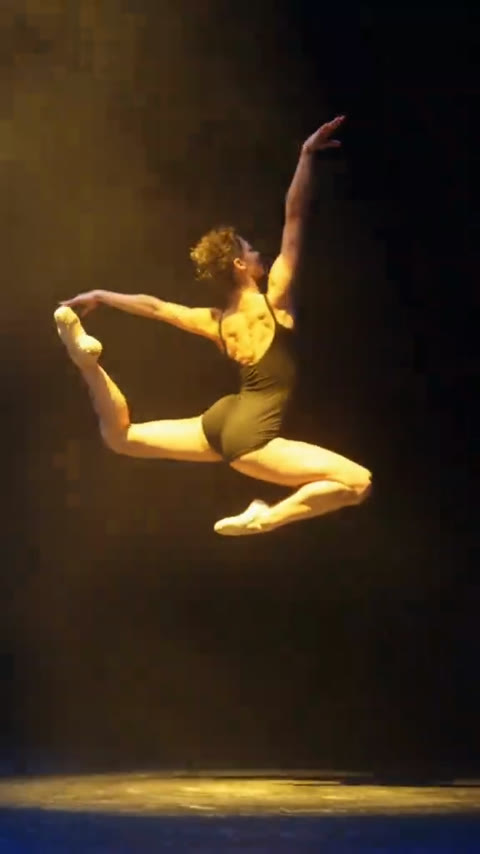
Turn a single portrait into a dramatic 360-degree camera orbit video. Powered by Kling 4.0, our AI pipeline places you in the center of an acrobatic mid-air leap as a dynamic orbital camera sweeps a full circle around you under dramatic stage spotlights with authentic bullet-time physics. No physical camera rigs, drones, or prompt engineering required.
Camera Orbit AI · 5s · 9:16
5s · 9:16 · 720p · original sound · ready in a few minutes
Orbital Staging
Three phases of seamless 360-degree orbital motion
Five seconds of continuous circular camera tracking synchronized with cinematic spotlight illumination and slow-motion physics.
The explosive leap
You burst upward from the reflective studio stage into the center of a circular overhead spotlight, limbs extending with athletic poise and commanding focus.
The bullet-time 360 freeze
At the apex of your jump, time slows to a cinematic crawl as the camera sweeps a fluid 360-degree circular orbit around your floating silhouette, revealing every angle.
The dramatic landing
Completing the full orbital revolution back toward the primary three-quarter angle, the camera tracks downward smoothly as you touch down onto the stage floor.
Same category
More Movie & TV templates
 NEW140 CR
 NEW270 CR
 NEW220 CR
 NEW240 CR
 NEW270 CR
 NEW400 CR
 NEW400 CR
 HOT320 CR
 NEW160 CR
 NEW10 CR
 HOT400 CR
 HOT320 CR
Simple Workflow
How to create your 360 Camera Orbit video
Creating an Hollywood-grade circular tracking shot requires only three intuitive steps on SameVid AI.
Upload your portrait
Pick a clear photo of yourself, a friend, or an avatar. Front-facing or slight three-quarter view photos with natural lighting work best for facial feature extraction.
Render with Kling 4.0
Our specialized Kling 4.0 video-edit pipeline maps your identity and facial structure onto the leaping performer, preserving 360-degree spatial depth and lighting continuity.
Save and share everywhere
Your high-definition 720p vertical video renders in about two to three minutes, complete with remuxed dramatic audio ready for TikTok, Instagram Reels, and YouTube Shorts.
Photos: JPG, PNG, WebP, up to 20 MB.
Deliverables
Everything included in your Camera Orbit generation
Receive a broadcast-ready social video tailored for high retention, loopability, and visual punch.
You upload
- 1 clear photo of one person (face clearly visible, good illumination)
You get
- 5-second cinematic 360-degree camera orbit video (9:16 vertical)
- High-definition 720p resolution powered by Kling 4.0 video edit
- Remuxed original electronic soundtrack with dramatic beat drops
- Clean presentation with no watermarks, no subtitles, and no UI overlays
| Duration | 5 seconds |
|---|---|
| Aspect ratio | 9:16 vertical |
| Resolution | 720p HD |
| Cost | 140 credits |
| Turnaround | About 2 minutes |
| Model engine | Kling 4.0 Video Edit |
| Credits | 140 per video, refunded if it fails |
Creative Inspirations
Great ideas for your 360 Orbit showcase
The 360-degree wraparound camera angle elevates any character into an iconic hero moment.
Dancers and gymnasts
Highlight athletic prowess, flexibility, and stage presence with a freeze-frame bullet-time jump that commands total audience attention.
Cosplayers and anime enthusiasts
Bring your cosplay character to life with an epic anime-style action freeze and circular orbital camera sweep that feels like a big-budget movie intro.
Fitness creators and athletes
Showcase physical conditioning, muscle definition, and explosive athletic power under high-contrast dramatic stage spotlights.
Fashion and streetwear influencers
Turn everyday streetwear or high-fashion outfits into a futuristic runway teaser that loops seamlessly on TikTok and Instagram.
Behind the Trend
From Matrix bullet time to instant AI orbital shots
How complex 120-camera movie rigs evolved into a single-click AI video transformation.
Evolution of bullet-time and orbital camera rigs
The 360-degree circular orbit effect first captivated global audiences in 1999 when The Wachowskis introduced bullet-time in The Matrix (1999) using an array of 120 synchronized still cameras. Later refined by action directors like Michael Bay with circular dolly tracking and adopted by drone manufacturers like DJI for automated QuickShots Orbit flights, the technique has long defined high-budget visual spectacle.
Today, generative AI models like Kling 4.0 eliminate the need for multi-camera rigs and spatial keyframing, allowing creators to infer full 3D orbital motion and realistic parallax from a single photograph in seconds.
Photo Guide
Tips for achieving flawless 360 orbital fidelity
Selecting the ideal reference photograph ensures sharp facial contours and crisp 360-degree anatomical coherence.
- Provide a crisp, well-focused photo from the chest up or full body with clear, balanced illumination across facial contours.
- Ensure eyes are wide open, hair is neatly arranged, and neutral or confident facial expressions are maintained.
- Simple solid-colored backdrops or clean outdoor settings allow the neural model to segment your silhouette effortlessly.
- Avoid heavy motion blur, harsh lens flare, heavy beauty filters, or heavy pixelation from compressed screenshots.
- Do not submit group portraits, mirrored selfies with phone obstruction, or photos where the face is partly hidden behind hats or scarves.
FAQ
Camera Orbit AI FAQ
What kind of photo works best for Camera Orbit AI?
A sharp, high-resolution photo taken from the chest up or full body with good front lighting works best. Keep your face clear, eyes open, and avoid heavy facial obstructions like thick ski masks or sunglasses. Everyday casual attire and colorful clothing are both supported.
How does SameVid generate the 360-degree orbital motion?
SameVid utilizes Kling 4.0 video-edit architecture combined with clean reference motion tracks. The AI extracts your facial features and skin texture, precisely mapping your identity onto the leaping performer while synthesizing the occluded angles as the orbital camera circles around your silhouette.
Does the final video include audio and music?
Yes. The video is generated silently by the model to prevent audio distortion, and then our rendering workflow automatically remuxes the original high-energy electronic soundtrack with dramatic beat drops directly into your finished MP4 file.
Are there any watermarks or logos on the downloaded video?
No. All videos generated through SameVid are 100% clean and free from watermarks, promotional end-cards, or on-screen subtitles. You receive full commercial rights to post and publish your video across any platform.
How many credits does one generation cost?
Each 5-second Camera Orbit AI video generation requires 140 credits, calculated proportionally from our standard video generation rate. You can preview the example video and review generation settings before submitting your task.
Can I use photos of products or scenery instead of people?
This specific template is optimized for single-person portrait and athletic performance transformations. For product showcases or landscape fly-arounds, explore our dedicated object and drone orbit templates in the template directory.
Keep scrolling
More viral AI video trends
 NEW400 CR
 NEW240 CR
 NEW270 CR
 NEW220 CR
 NEW300 CR
 NEW270 CR
 NEW350 CR
 NEW270 CR
 NEW380 CR
 NEW240 CR
 NEW320 CR
 NEW400 CR