
Transformation · New
You Rock My World AI Video Generator
Upload one or two clear photos to star in an 11-second 720p 9:16 You Rock My World outfit transition. Casual living-room vibes switch cleanly behind a hand-cover wipe into tailored evening looks with synced audio for 300 credits.
You Rock My World AI · 11s · 9:16
Choose either partner or both—each slot is optional; add at least one clear front portrait to star in the 11-second hand-cover outfit reveal.

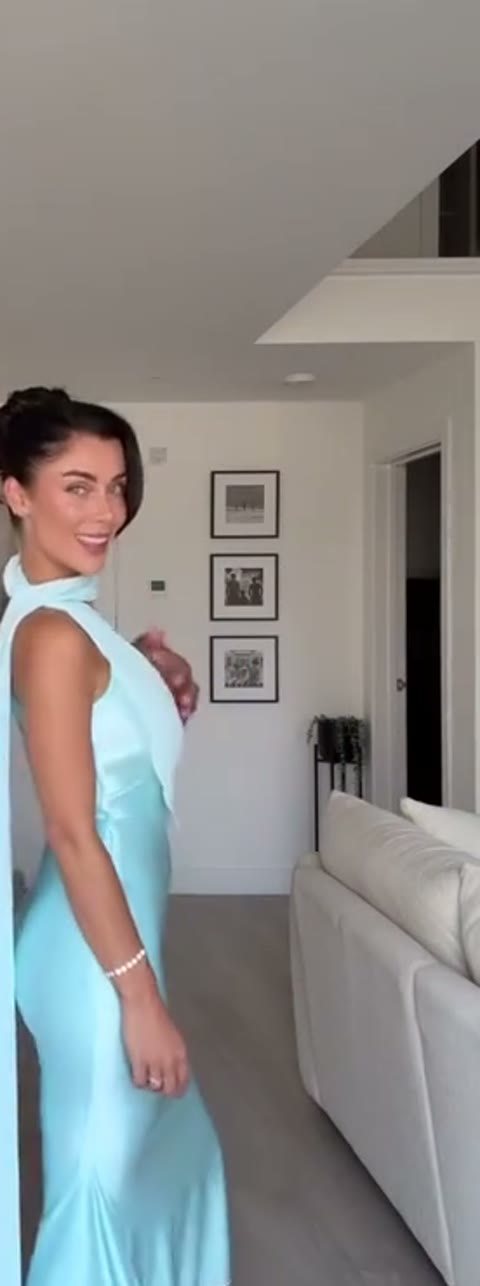
11s · 9:16 · 720p · authentic sound · ready in a few minutes
How it works
How to make the You Rock My World AI transition
Turn still portraits into the beat-synced hand-cover outfit reveal in three quick steps without filming two wardrobe changes.
Upload one or two portraits
Pick Left Partner, Right Partner, or both using clear front-facing JPG, PNG, or WebP photos under 20 MB. Any slot you leave open keeps the original performer.
Let Kling 4.0 build the reveal
Click generate to map your portraits into the 11-second living-room sequence—casual groove first, open-palm lens wipe in the middle, and formal evening wear at the beat drop.
Download with synced audio
Save your finished 720p 9:16 MP4 complete with the soundtrack already mixed in, ready to post straight to your feed or story.
Photos: JPG, PNG, WebP, up to 20 MB.
Same category
More Transformation templates
 NEW140 CR
 NEW350 CR
 NEW400 CR
 NEW140 CR
 NEW220 CR
 NEW400 CR
 NEW220 CR
 NEW140 CR
 NEW270 CR
 NEW190 CR
 NEW270 CR
 NEW140 CR
Ready to post
Captions and hashtags that match the trend
Short, playful lines pair best with the sudden wardrobe switch so viewers catch the reveal right on the beat.
- “You rock my world ❤️ #transitions #yourockmyworld”
- “Before and after one hand wipe ✨ #beforeandafter #coupletransition”
- “Final result 😤✅ #transition #yourockmyworld #glowup”
- “I think this is my go-to trend 😌❤️🔥 #michaeljackson #yourockmyworld”
- “From couch clothes to evening wear in 11 seconds 🥂 #outfittransition”
- Keep on-screen text minimal during the first three seconds so the casual-to-formal contrast lands cleanly.
- Post the 9:16 MP4 directly with the built-in audio, or pair it with your favorite trending sound mix in your social editor.
- Tag your partner or friend in the caption to invite duet replies and outfit-swap remixes.
Examples
What the You Rock My World AI transition looks like
Preview the 11-second reference clip that guides the camera framing, hand-cover wipe, and formal reveal.
Living-room casual to evening wear
A bright, single-camera living-room transition where two partners groove in casual outfits, cover the lens with an open palm, and reveal tailored cream suiting and an ice-blue satin gown.
djandcallyAlso called
Names people use for this transition
Creators and editors tag the format under several related phrases depending on whether they highlight the song, the wipe, or the outfit glow-up.
You Rock My World transition
The most common tag for two-person clips built around Michael Jackson’s 2001 R&B hit, focusing on the beat-synced wardrobe switch.
Couple glow-up edit
Used when partners contrast everyday loungewear or gym clothes with wedding attire, tailored suits, or formal evening gowns.
Hand-cover outfit reveal
Describes the signature palm-over-lens motion that hides the cut between casual opening frames and the dressed-up finale.
Before-and-after reveal
A broader hashtag family (#beforeandafter) where creators pair the track with cultural bridal looks, themed costumes, or red-carpet styling.
From TikTok
How creators remix You Rock My World AI
From themed costumes to traditional bridal wear, creators adapt the same hand-cover beat drop to wildly different wardrobes.
@cadelandmia
Swaps everyday tees in the living room for full Viking fur-and-armor costumes right after the hand wipe.
@sarahnoman_
Turns a casual hallway opening into ornate gold-and-crimson South Asian bridal and groom attire.
Photo tips
Photo tips for both partners
Both partners change outfits mid-clip, so the face is what carries identity through the hand-cover transition.
- Use a front-facing portrait for each partner with the face sharp and evenly lit.
- Upload one person per slot so the left and right partners keep the right faces.
- Pick photos with a relaxed, natural expression; both partners pose and smile after the reveal.
- Sunglasses, hats or hair covering the eyes and forehead.
- Group photos, heavy beauty filters or faces turned far to the side.
Who to put in
Who to put in the transition
Two partner slots, each optional. Any pair that wants a casual-to-formal glow-up works.
You and your partner
The original pairing: a couple switching from lounge clothes to a suit and an evening gown.
Best friends
Two friends trading hoodies for formal wear in one hand-cover wipe.
Just you
Fill one slot and get the reveal next to the original partner.
FAQ
You Rock My World AI FAQ
Do I need to upload two photos for You Rock My World AI?
Both Left Partner and Right Partner slots are optional. Upload two portraits to cast both roles, or upload a single portrait to replace one partner while the other keeps the reference performer in place.
How long is the generated video and how many credits does it cost?
Each generation produces an 11-second vertical 9:16 MP4 in 720p HD with synced audio and costs 300 credits.
What kind of photos give the cleanest face match?
Front-facing portraits with even lighting, clear eyes, and an unobstructed hairline work best. Uploading a separate solo photo for each slot helps keep both faces sharp and distinct through the transition.
Does the output include sound?
Yes. The finished MP4 includes the synced audio track automatically, so you can share your video right away without adding music in another app.
Can friends or family use this template too?
Yes. While couples popularized the living-room outfit reveal, any two friends, siblings, or solo creators can step into the left and right roles for a playful wardrobe glow-up.
Do I need to film a transition or write a prompt?
Not at all. Just upload one or two photos and click generate. The template handles the casual opening, hand-cover lens wipe, and formal outfit reveal automatically.
Can I upload just one partner?
Yes. Fill either slot and the other partner stays as in the original clip, still doing the hand-cover reveal beside you.
What if the generation fails?
Credits for a failed video are returned automatically and you can try again with the same or different photos.
Keep scrolling
More viral AI video trends
 NEW400 CR
 NEW240 CR
 NEW270 CR
 HOT270 CR
 NEW350 CR
 NEW270 CR
 NEW380 CR
 NEW240 CR
 NEW320 CR
 NEW400 CR
 NEW270 CR
 NEW240 CR