
Transformation · New
Mermaid AI Video Generator
Upload one clear front-facing photo of yourself, a friend, or a pet to create a 5-second 9:16 720p underwater mermaid transformation with a splash reveal, shimmering scales, and original audio for 140 credits.
Mermaid AI · 5s · 9:16
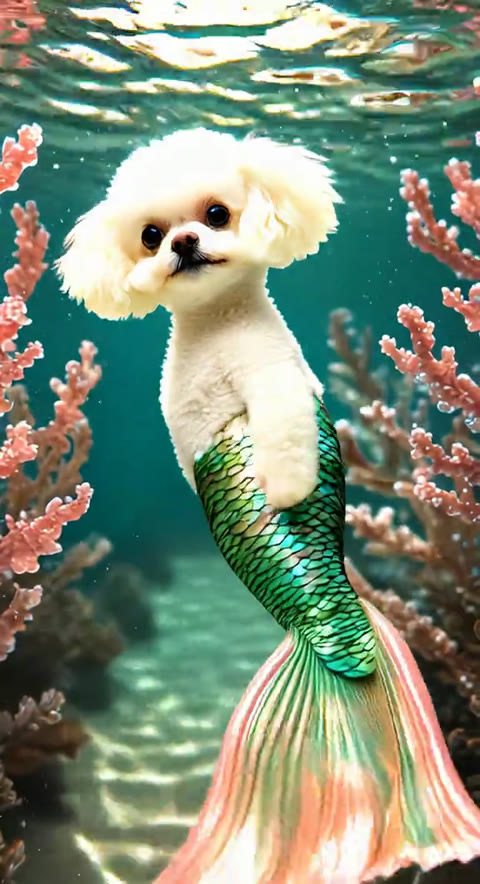
5s · 9:16 · 720p · original sound · ready in a few minutes
Examples
See the splash-to-mermaid reveal in action
The 5-second clip opens on your photo, washes the lens in ocean foam, and reveals an underwater mermaid tail.
Viral splash-to-mermaid reference
A calm indoor portrait gives way to a bright rush of sea foam before settling into sunlit turquoise water with an emerald-and-coral tail fin swaying between reefs.
Same category
More Transformation templates
 NEW300 CR
 NEW140 CR
 NEW350 CR
 NEW400 CR
 NEW220 CR
 NEW400 CR
 NEW220 CR
 NEW140 CR
 NEW270 CR
 NEW190 CR
 NEW270 CR
 NEW140 CR
Three steps
How to make a Mermaid AI video from one photo
No prompt writing or video editing required. One front-facing photo is all it takes to build the underwater reveal.
Upload one clear photo
Drop in a JPG, PNG, or WebP portrait up to 20 MB showing one person or pet facing forward in even lighting.
Lock the subject identity
The generator keeps your face, hairstyle, or pet coat intact while preparing the pre-splash opening frame.
Render the 5-second reveal
Spend 140 credits to generate a 720p 9:16 video with the ocean splash transition, shimmering scales, and original audio.
Download and post
Save the finished MP4 directly to your device and share it on Reels, Shorts, or TikTok with your favorite ocean caption.
Photos: JPG, PNG, WebP, up to 20 MB.
From TikTok
The viral clip behind the Mermaid AI trend
Creators turned pets, beach portraits, and everyday selfies into underwater mermaids set to dreamy pop tracks.
@blue.poodle
12.3M views — A white poodle sitting on a bed gets swept into sunlit ocean water and sprouts an iridescent emerald-and-coral mermaid tail.
Trend origin
Where the AI Mermaid Filter trend came from
Born in late May 2025 as "AI Mermaid Core," the underwater transformation surged past millions of clips and returned with fresh template remixes in late 2026.
The May 2025 breakout and AI Mermaid Core
The AI Mermaid Filter went viral around May 21, 2025, when creators began feeding everyday selfies, golden retrievers, and celebrity portraits into early image-to-video tools to reveal shimmering underwater tails.
Early clips gained extra momentum from playful physics quirks—floating tails and dramatic splash cuts—that viewers affectionately dubbed "AI Mermaid Core," pushing total trend uploads past 5.4 million by May 28, 2025, according to MyMemeCards.
The signature soundtrack and 2026 resurgence
Many of the earliest breakout posts paired the underwater reveal with ROSÉ’s "Messy," including @blue.poodle on TikTok (12.3M views), which set the clean 5-second splash-to-reef pacing for Mermaid AI edits.
In October and November 2026, a second wave of ocean-princess templates revived the format on short-form feeds, with creators using cleaner modern video models to keep faces sharp and tail transitions seamless.
Ready to post
Captions creators use with the Mermaid AI trend
Copy a real caption from the viral wave or tweak one to match your photo before posting.
- “Mermaid 🧜🏻♂️ ✨🩵 #aimermaid #aimermaidfilter #mermaidfilter #sirena”
- “Finally tried the mermaid filter 🧜♀️ #mermaid #mermaidtiktok #aivideo”
- “When technology meets magic, a new kind of mermaid is born. 🌊💫”
- “Turning my everyday selfie into an ocean princess reveal ✨🐚”
- “POV: the ocean claimed me in 5 seconds flat 🧜♀️🩵”
- “Zero tail costume required—just one photo and an underwater glow-up 🌊✨”
- Keep the subject centered with clear lighting so the splash transition lands cleanly on the face or pet.
- Post the 9:16 MP4 natively to vertical feeds with hashtags like #aimermaid, #mermaidfilter, and #mermaidcore.
- Pair the clip with dreamy pop or ocean ambient tracks if you remix the sound in your social editor.
- Try both human portraits and pet photos—dogs and cats sitting upright create instant comedy contrast.
Ideas
Four fun ways to use the Mermaid AI generator
A single splash reveal works across pets, beach snapshots, childhood throwbacks, and fantasy cosplay.
Pet mermaid glow-up
Upload a front-facing photo of your dog or cat sitting upright. Watching a sleepy house pet get washed into a coral reef with a bright green tail is the most shared format on social feeds.
Beach and vacation portraits
Use a sunny seaside or poolside photo so the incoming ocean foam feels like a natural continuation of your real background before diving underwater.
Childhood photo throwbacks
Bring old family albums to life by turning a childhood portrait into a storybook ocean princess moment without needing costumes or props.
Fantasy cosplay previews
Test iridescent emerald, sapphire, or pearl-pink mermaid looks from a simple headshot before committing to festival makeup or a photo shoot.
FAQ
Mermaid AI FAQ
What kind of photo works best for Mermaid AI?
Use a single-subject, front-facing photo with even lighting and an unobstructed face or pet silhouette. Clear portraits in JPG, PNG, or WebP up to 20 MB give the cleanest underwater scale and face preservation.
Can I use this template on my dog or cat?
Yes. Pets sitting upright and looking toward the camera work especially well—in fact, the 12.3M-view viral reference for this trend features a white poodle transforming into a reef mermaid.
How long is the generated Mermaid AI video and what resolution is it?
Every generation produces a 5-second vertical 9:16 video at 720p resolution, matching the fast splash-to-underwater pacing of the viral trend.
How many credits does Mermaid AI cost?
Generating one 5-second 720p Mermaid AI video costs 140 credits, scaled proportionally from our standard 15-second rate. There is no subscription required.
Does the output video include sound?
Yes. SameVid muxes the original trend audio track onto your finished 5-second MP4 so the clip is ready to download and post right away.
Do I need to write prompts or use a separate editing app?
Everything is automated. Just upload one photo and click Generate—the splash transition, sunlit coral reef lighting, and tail animation are handled for you.
How is this different from static mermaid portrait filters?
Instead of outputting a single still image, Mermaid AI animates the full 5-second sequence: your original subject on land, the incoming ocean splash, and the smooth underwater tail swim.
Keep scrolling
More viral AI video trends
 NEW270 CR
 NEW270 CR
 NEW320 CR
 NEW140 CR
 NEW350 CR
 NEW270 CR
 NEW380 CR
 NEW240 CR
 NEW320 CR
 NEW400 CR
 NEW270 CR
 NEW240 CR