
Effects · New
Luxury Shopping Walk AI Video Generator
Turn one photo into a 10s Luxury Shopping Walk AI clip down a marble boutique corridor, complete with a sunglasses smile, 720p vertical output, audio, and 270 credits.
Luxury Shopping Walk AI · 10s · 9:16
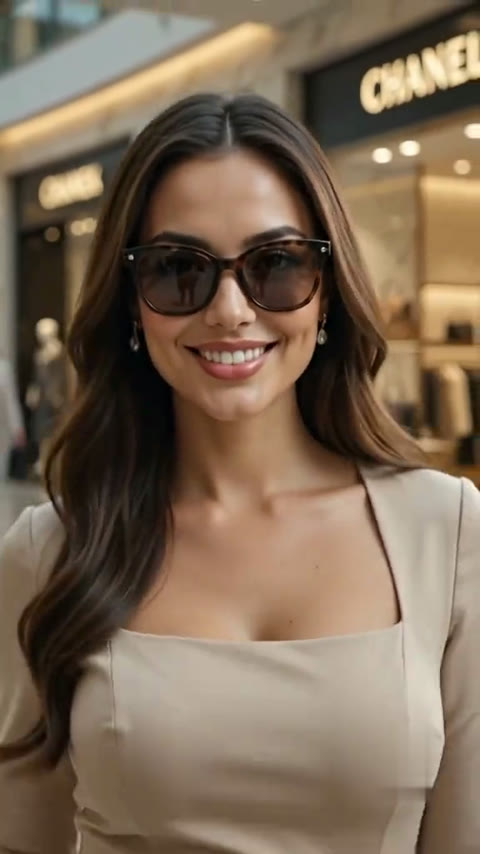
10s · 9:16 · 720p · original sound · ready in a few minutes
The scene
How the luxury shopping walk unfolds second by second
Three continuous beats turn one portrait into a poised boutique stroll, a sunglasses close-up smile, and a relaxed over-the-shoulder exit.
0–3s: Confident marble corridor entrance
The camera tracks smoothly backward along a bright luxury mall walk arcade framed by warm glass storefronts and polished stone reflections. You stride forward with calm main-character poise carrying a structured handbag at your side, letting your silhouette establish the quiet luxury mood right away.
3–7.8s: Boutique close-up and sunglasses smile
As framing glides into an intimate chest-up portrait before glowing boutique awnings, you ease your pace, raise one hand lightly toward your sunglasses frame, and smile straight into the lens. This beat gives your facial features, hair texture, and personal expression clear spotlight focus.
7.8–10s: Over-the-shoulder look-back exit
You pivot naturally toward the deeper end of the mall arcade, handbag resting neatly in hand, and glance back over your shoulder with a warm smile as gallery lights fade behind you. Every Luxury Shopping Walk AI clip lands on that signature effortless finish.
Same category
More Effects templates
 NEW270 CR
 NEW240 CR
 NEW140 CR
 NEW270 CR
 NEW140 CR
 NEW270 CR
 NEW140 CR
 NEW140 CR
 NEW400 CR
 NEW140 CR
 NEW190 CR
 NEW270 CR
Who to put in
Who shines in the luxury shopping walk AI template
One clear portrait drives the entire Luxury Shopping Walk AI sequence for everyday selfies, AI fashion walk lookbooks, and playful contrast posts.
Your own selfie for soft-life edits
Drop in one everyday front portrait and watch yourself glide past designer-style storefronts in a polished 10-second reel. It captures quiet luxury daydream and vision-board energy right from a casual photo—skipping the studio booking, full wardrobe haul, and weekend mall trip.
Friends and partners for contrast humor
With their permission, turn a casual snapshot of a friend, sibling, or partner into a sleek boutique VIP moment. Pairing an everyday hoodie or coffee-run photo with poised marble-corridor struts makes classic "I said I was just looking" Luxury Shopping Walk AI edits land even harder in group chats.
Stylists, creators, and digital lookbooks
Fashion creators, personal stylists, and indie labels can preview how a look, silhouette, or mood board moves through a high-end retail promenade. Turning a static studio portrait or outfit shot into a moving AI fashion walk video brings still lookbooks to life in minutes.
From TikTok
How creators style the luxury walk trend online
From boutique marble corridors to lakeside luxury walk promenades and private helicopter aprons, creators remix this aesthetic across settings.
@tiktokaunties1
The flagship luxury mall walk: a poised boutique corridor stroll with handbag in hand, followed by a sunglasses close-up smile and a clean over-the-shoulder turn.
@3mariaaah
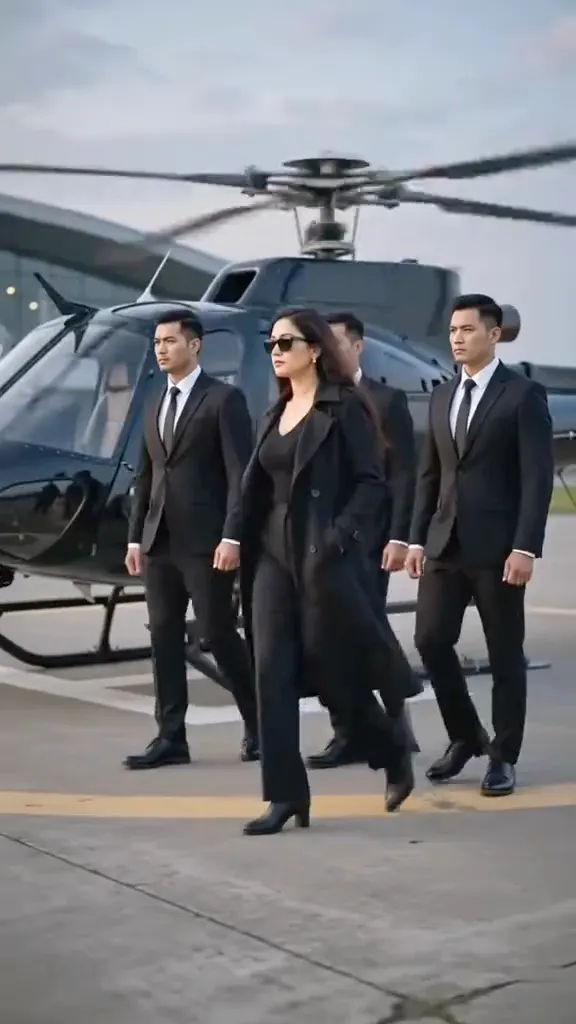
The black-suit helicopter luxury walk variant, turning one portrait into an eight-second VIP arrival stride set to a crisp fashion beat.
@prakashchhetri256
A sharp menswear lakeside luxury walk interpretation in tailored charcoal suiting and sunglasses, showing how smoothly the format adapts across wardrobes.
Ready to post
Ready-to-post captions for your shopping walk clip
Pair your Luxury Shopping Walk AI export with the "just looking" jokes, vision-board hooks, and soft-life lines trending on Reels and Shorts.
- “"I am just looking," she said, walking past every boutique window in the mall.”
- “This entire Luxury Shopping Walk AI clip started from one still photo on my camera roll.”
- “Vision board in motion: pure marble-corridor main-character energy.”
- “POV: You stepped out for one errand and ended up owning the luxury arcade.”
- “Quiet luxury stroll, one effortless handbag swing, and an over-the-shoulder exit.”
- “Skip the film crew and weekend crowds—ten seconds of pure boutique poise.”
- Lead with a quick glimpse of your original portrait before cutting into the 10-second Luxury Shopping Walk AI clip so viewers see the single-photo transformation.
- Choose an evenly lit front-facing photo in JPG, PNG, or WebP format up to 10 MB so your facial features stay crisp during the close-up sunglasses beat.
- Match your post hashtags to the mood—#QuietLuxury, #SoftLife, #MainCharacterEnergy, and #OOTD pair cleanly with AI lifestyle reels.
Output specs
What goes into your Luxury Shopping Walk AI clip
Every Luxury Shopping Walk AI run uses Kling 4.0 reference-to-video at 270 credits, locking camera motion and audio while casting you as lead.
You upload
- One clear front-facing or half-body portrait of a single person in JPG, PNG, or WebP format up to 10 MB.
- Even daylight or indoor lighting with clearly visible facial features so Kling 4.0 preserves your likeness in both wide and close shots.
- Prompt-free setup with built-in luxury mall walk camera choreography—upload your portrait and start directly.
You get
- A clean 10-second vertical 9:16 MP4 at 720p ready for TikTok, Instagram Reels, and YouTube Shorts.
- Full character replacement inside the sunlit marble boutique corridor, complete with handbag stride, close-up smile, and over-the-shoulder exit.
- Original rhythmic fashion soundtrack merged cleanly onto your finished Luxury Shopping Walk AI video, saved in My Work.
| Photos | 1 clear front portrait (JPG, PNG, or WebP, max 10 MB) |
|---|---|
| Model | Kling 4.0 (reference-to-video) |
| Duration | 10 seconds |
| Picture | 720p, 9:16 vertical |
| Audio | Original rhythmic soundtrack merged |
| File | Clean MP4, watermark-free |
| Credits | 270 per video, refunded if it fails |
Photos: JPG, PNG, WebP, up to 20 MB.
FAQ
Luxury Shopping Walk AI FAQ
What is the Luxury Shopping Walk AI trend?
Luxury Shopping Walk AI is a short-form video style inspired by quiet luxury boutique strolls and "I said I was just looking" shopping reels. Upload one still portrait to generate a 10-second marble-corridor walk with a close-up smile and look-back finish.
What kind of photo works best for Luxury Shopping Walk AI?
Upload one clear, evenly lit front or half-body portrait of a single person in JPG, PNG, or WebP format up to 10 MB. When your eyes, brow line, hair, and expression are clearly visible against a clean background, the Luxury Shopping Walk AI model holds your likeness accurately across wide and close shots.
Does the model replace the original shopper completely?
Your uploaded person becomes the sole shopper in every frame. The original figure is completely replaced so your face, hairstyle, skin tone, and coordinated outfit lead the entire 10-second walk from the marble corridor entrance to the closing glance.
Do I need a full-body photo or custom prompt?
A single head-and-shoulders or half-body portrait works right away, and built-in motion control handles all pacing automatically. When you upload a portrait crop, Kling 4.0 naturally extends a tailored neutral outfit, handbag pose, and matching heels to fit the boutique arcade setting.
What video format, length, and audio do I receive?
You receive a 10-second, 9:16 vertical MP4 at 720p, clean and watermark-free, with the original rhythmic fashion soundtrack merged into the final file for TikTok, Reels, and YouTube Shorts.
How does Luxury Shopping Walk AI work without prompts, and how long does rendering take?
Upload one portrait, click Generate, and Kling 4.0 reference-to-video applies the locked three-beat boutique camera path automatically in roughly five minutes—finished clips appear in My Work ready to download.
How many credits does one video cost, and what if generation fails?
Each Luxury Shopping Walk AI video costs 270 credits, scaled proportionally from the 10-second 720p reference length. If a generation task fails to complete, those credits return to your balance automatically.
Are my uploaded photos and finished videos private?
Your uploaded photos and finished exports stay inside your personal My Work library for private access, and paid exports arrive watermark-free so you can publish directly to your social channels.
Keep scrolling
More viral AI video trends
 NEW240 CR
 HOT300 CR
 NEW380 CR
 NEW350 CR
 NEW380 CR
 NEW320 CR
 NEW400 CR
 NEW300 CR
 NEW350 CR
 NEW400 CR
 NEW240 CR
 NEW400 CR