
Transformation · New
Fitting Room Outfit Change AI Video Generator
Upload 1 clear front-facing photo to star in a 15-second Fitting Room Outfit Change AI video, gliding past five burgundy velvet curtains to reveal five outfits in 720p HD with original sound for 400 credits.
Fitting Room Outfit Change AI · 15s · 9:16
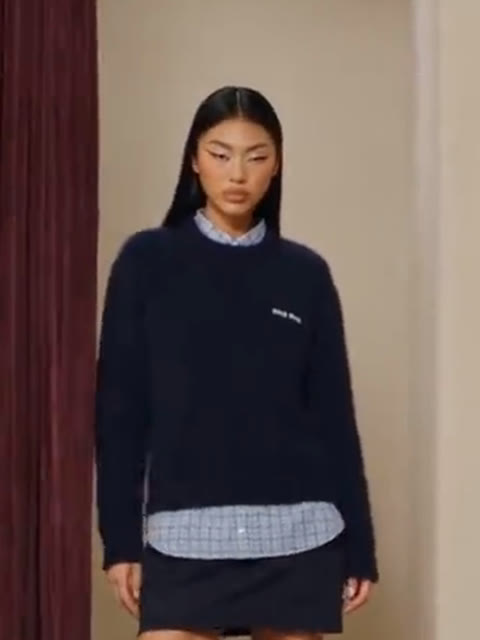
15s · 9:16 · 720p · original sound · ready in a few minutes
Shot by Shot
Five curtain reveals in the Fitting Room Outfit Change AI Video Generator
One continuous sideways tracking glide moves past five burgundy velvet stalls, unveiling a complete new look behind every curtain.
0:00 – 0:02.5 · Closed Velvet Curtains
The Fitting Room Outfit Change AI clip opens on a smooth left-to-right glide across cream studio walls and tall closed burgundy velvet curtains before the first stall opens.
0:02.5 – 0:05.5 · Leather Jacket & Yellow Satin Dress
A hand pulls the first curtain aside to reveal you standing full-length in a dark brown leather jacket layered over a yellow satin slip dress, tall western boots, a suede tote, and dark sunglasses.
0:05.5 – 0:08 · Preppy Navy Sweater & Striped Shirt
As the camera tracks rightward in your Fitting Room Outfit Change AI video, the second stall opens to show your natural face clearly in a navy crewneck knit over a pale blue collared shirt, pleated mini skirt, crew socks, and Mary Janes.
0:08 – 0:11 · Double Denim Street Look
The third curtain sweeps back on a cropped indigo denim jacket paired with a matching denim top, relaxed wide-leg jeans, a deep red handbag, and dark sunglasses.
0:11 – 0:13.7 · Striped Knit & Draped Scarf
In the fourth fitting room reveal, you wear an olive-and-cream striped turtleneck sweater with a matching draped scarf, a structured dark brown mini skirt, slingback heels, a patterned bag, and sunglasses.
0:13.7 – 0:15 · Tailored Black Blazer Finale
The fifth curtain opens on an oversized black tailored blazer over a sheer black lace midi skirt, dark sandals, a mini clutch, and sunglasses as the Fitting Room Outfit Change AI glide finishes.
Same category
More Transformation templates
 NEW300 CR
 NEW140 CR
 NEW350 CR
 NEW400 CR
 NEW140 CR
 NEW220 CR
 NEW400 CR
 NEW220 CR
 NEW140 CR
 NEW270 CR
 NEW190 CR
 NEW270 CR
How It Works
Make your Fitting Room Outfit Change AI video in three quick steps
Turn a single portrait into a smooth five-look fitting room showcase straight in your browser without filming extra takes or editing cuts.
Upload one clear portrait
Drop one sharp, front-facing portrait or waist-up photo into the upload slot using a JPG, PNG, or WebP file up to 10 MB.
Start the Kling 4.0 render
Click Generate (400 credits) to let Kling 4.0 map your face, eyes, skin tone, and hairstyle onto every stall along the 15-second Fitting Room Outfit Change AI tracking glide.
Download and share with sound
Preview your finished 9:16 vertical 720p MP4 clip in My Work with the synchronized soundtrack merged in, then download and post.
Photos: JPG, PNG, WebP, up to 20 MB.
Photo Guide
Photo tips for your Fitting Room Outfit Change AI video
Because each fitting room frames your full outfit from head to toe, starting with a close, well-lit face photo keeps every reveal crisp.
- Upload a sharp waist-up or shoulders-up photo facing directly toward the lens so your facial features stay detailed across all five Fitting Room Outfit Change AI stalls.
- Use bright, even daylight or clean indoor lighting with your natural hairstyle visible and both eyes open so Look 2 renders your expression accurately.
- Feature one person centered in the frame against any everyday background; the Fitting Room Outfit Change AI generator builds the cream boutique stalls around you.
- Choose a clear portrait with uncovered eyes and forehead, allowing the template to style sunglasses naturally in Looks 1, 3, 4, and 5.
Reference & Styles
Fitting Room Outfit Change AI examples and community formats
Compare the five-curtain studio reference used for this generator alongside classic retail mirror cuts and duo swap formats.
Five-Curtain Velvet Fitting Room Glide (Template Reference)
The 15-second one-take Fitting Room Outfit Change AI reference clip gliding past five burgundy velvet curtains to reveal five curated outfits in sequence while preserving camera motion, lighting, and sound.
Mirror Fitting Room Four-Look Cut
An 11-second retail mirror try-on transition cycling cleanly through four bottoms in one wood-and-curtain fitting stall, showing how quick fitting room outfit reveals took off.
anggjimenezDuo Outfit Swap Against Plain Wall
An 8-second two-person outfit swap where both partners trade complete tops, bottoms, and headwear in one clean stationary frame.
tigheandluluMore Transformations
Explore more AI outfit and transformation templates
Pair your Fitting Room Outfit Change AI video with rotating gown transitions, glam filters, or cinematic costume transformations.
 NEW320 CR
 NEW140 CR
 NEW10 CR
Ready to pull back all five fitting room curtains?
Upload 1 portrait and generate your 15-second Fitting Room Outfit Change AI video in 720p HD with original sound for 400 credits.
FAQ
Fitting Room Outfit Change AI FAQ
How does the Fitting Room Outfit Change AI Video Generator work?
Fitting Room Outfit Change AI turns one clear front-facing photo into a 15-second five-curtain outfit reveal video. Kling 4.0 reference-to-video follows the sideways tracking glide past five burgundy velvet stalls while keeping your face, skin tone, and hairstyle consistent.
Do I need to upload separate clothing photos or write a prompt?
You only need one portrait photo, with zero clothing images or prompt writing required. The Fitting Room Outfit Change AI template styles all five outfits automatically—leather jacket over yellow satin, navy preppy knit, double denim, striped knit, and black blazer.
Why does a waist-up portrait work better than a distant full-body shot?
A sharp waist-up or shoulders-up photo gives Kling 4.0 maximum facial detail for full-length fitting room frames. Because each stall shows you head to toe, close-up clarity keeps your likeness crisp in every reveal.
Does the Fitting Room Outfit Change AI video include the soundtrack?
Yes, every Fitting Room Outfit Change AI export includes the synchronized original soundtrack merged into the finished clip. While the silent reference guides visual motion, SameVid remuxes the audio automatically before delivery.
What resolution, aspect ratio, and length do I get?
Each Fitting Room Outfit Change AI render outputs a watermark-free 15-second vertical 9:16 MP4 at 720p HD. The dimensions and pacing fit TikTok, Instagram Reels, and YouTube Shorts natively.
Should my uploaded portrait have uncovered eyes and hair?
An open face with clear eyes and natural hair produces the strongest likeness across all five stalls. The Fitting Room Outfit Change AI template adds sunglasses automatically in Looks 1, 3, 4, and 5 while leaving your bare face visible in Look 2.
How many credits does one Fitting Room Outfit Change AI video cost?
One 15-second 720p Fitting Room Outfit Change AI video costs 400 credits, scaled from the 15-second benchmark. Any failed or filtered job automatically refunds all 400 credits to your balance.
Keep scrolling
More viral AI video trends
NEW320 CRNEW140 CRNEW10 CR NEW350 CR
 NEW270 CR
 NEW380 CR
 NEW240 CR
 NEW320 CR
 NEW400 CR
 NEW270 CR
 NEW240 CR
 NEW400 CR