
Transformation · New
Lion Transform AI Video Generator
Upload 1 photo to star in the 10s Lion Transform AI video: stand in sunlit desert dunes, vanish inside a swirling sandstorm, and emerge as a towering lion-headed warrior. 9:16 720p MP4 with epic soundtrack in My Work for 270 credits.
Lion Transform AI · 10s · 9:16
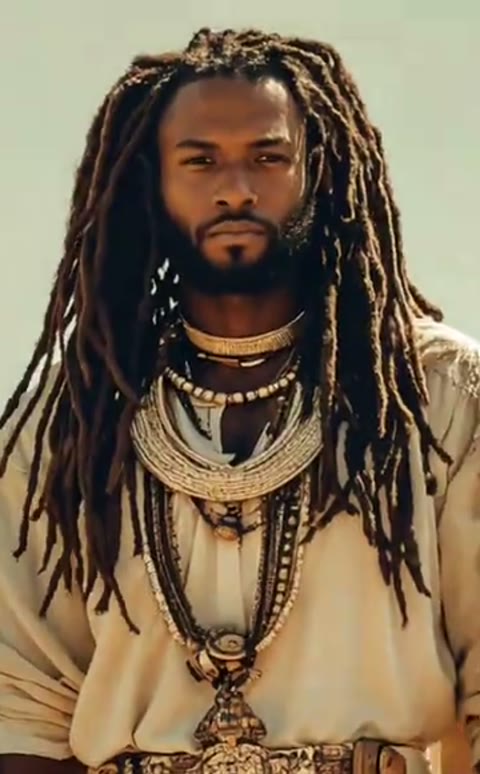
10s · 9:16 · 720p · original sound · ready in a few minutes
Trend Examples
See how Lion Transform AI turns one photo into a lion warrior reveal
Compare the flagship desert sandstorm lion transformation with viral mecha-suit remixes circulating across short-form feeds.
Desert Sandstorm Lion Warrior
The 10-second reference clip where one figure stands beside a lion in golden dunes before a sandstorm reshapes them into a lion-headed warrior.
@epic_kor_aiGolden Mecha Lion Armor Variant
A 12-second superhero variant where touching a miniature cub triggers golden mechanical armor and a blazing sword leap.
@zynkoshortsSame category
More Transformation templates
 NEW300 CR
 NEW140 CR
 NEW350 CR
 NEW400 CR
 NEW140 CR
 NEW220 CR
 NEW400 CR
 NEW220 CR
 NEW140 CR
 NEW270 CR
 NEW190 CR
 NEW270 CR
Input Guide
How to choose a portrait for clean human-to-lion identity lock
Community creators often hit uncanny half-lion morphs or identity drift on generic tools—clear framing solves both before generation starts.
- Use one sharp front-facing portrait or waist-up photo in even daylight so the Lion Transform AI pipeline with Kling 4.0 keeps your facial bone structure, hair texture, and skin tone clear before blending them into the lion mane.
- Pick a simple, uncluttered background with upright posture and visible shoulders. A calm, direct gaze translates naturally into the confident forward walk of the transformed lion warrior.
- Avoid group selfies, heavy sunglasses, hands covering the chin, or extreme wide-angle distortion—extra faces or occluded features trigger anatomical glitches during the 2-second sandstorm morph.
- Avoid cropped top-of-head shots or harsh neon lighting that clashes with the warm sunlit sand dunes, and never upload photos of private individuals without permission.
Scene Breakdown
Four desert morph beats inside the 10-second transformation video
Every generation follows one continuous desert tracking arc—no jarring jump cuts, no mid-morph four-legged glitches, and zero watermarks.
0.0s – 2.0s: Sunlit Desert Stance Beside the Lion
In the opening seconds of a Lion Transform AI clip, wide medium-full framing places your subject in draped cream desert robes and layered necklaces beneath warm daylight, standing steadily beside a seated male lion against golden sand dunes.
2.0s – 3.8s: Swirling Sandstorm Engulfs the Frame
As the camera glides forward, wind-whipped golden sand surges upward from the dune floor, wrapping both the human figure and the lion in a dense, sunlit dust cloud that conceals the transition seamlessly.
3.8s – 6.2s: Lion-Headed Warrior Reveal
The swirling dust clears around a single towering, muscular lion-headed warrior. Your subject’s hair flows directly into a thick golden-brown mane while keeping the open desert robes, beaded necklaces, and round gold belt medallion.
6.2s – 10.0s: Heroic Desert Stride & Final Turn
Pulling slightly wider into a heroic full-torso frame, the lion warrior marches steadily forward through blowing desert grit and turns their head sharply toward the horizon as the epic score peaks.
Output & Specs
What goes into Lion Transform AI and what comes out
SameVid AI replaces multi-tool prompt guesswork with one preset Kling 4.0 motion guide and remuxed soundtrack.
You upload
- 1 solo portrait or waist-up photo (JPG, PNG, or WebP, up to 20 MB)
- 300 px to 5,999 px per side with up to a 2.5× aspect ratio
- Works cleanly for people, upright pet portraits, or stylized character art
- Zero prompt writing, keyframe stitching, or external audio editing needed
You get
- 1 vertical 9:16 MP4 video (10 seconds, 720 × 1280 HD at 30 fps)
- Epic orchestral soundtrack remuxed cleanly after the silent Kling render
- Clean edge-to-edge frame with zero third-party logos or burned-in captions
- Instant playback and direct MP4 download saved permanently in My Work
| Photos | 1 clear solo portrait or upper-body photo |
|---|---|
| AI Model | Kling 4.0 Omni Reference (silent visual guide) |
| Duration | 10 seconds (continuous 4-beat sandstorm morph) |
| Resolution | 720p HD (720 × 1280 px, native 9:16 vertical) |
| Audio | Original God Of War-style orchestral track remuxed on output |
| Pricing & Trial | $9.90 Basic plan includes 400 credits (10 free on signup) |
| Storage & Refunds | Saved in My Work; automatic credit refund on failure |
| Credits | 270 per video, refunded if it fails |
Photos: JPG, PNG, WebP, up to 20 MB.
From TikTok
Trending lion transformation formats across TikTok
Beyond the desert lion-warrior template here, creators remix lion transformations across sprint morphs, cyber-lion cores, and stadium crowds.
@ai.cat200
5-second 720p Lion Transform AI sprint variation where a runner leaps straight toward the camera and lands mid-stride as a charging white lion.
@transformix.lab5
54.4K-play mechanical-core spin-off where a tossed metallic orb unfolds on savanna dirt into a roaring robotic lion.
@formationqueens1
15-second stadium crowd spectacle where hundreds of orange-clad performers assemble into a massive roaring lion.
Post Hooks
How creators caption human-to-lion reels and TikToks
Pair the desert transformation with deadpan Sigma Lion captions or dramatic glow-up reveals to boost watch-through and replays.
Deadpan "The Lion Does Not Concern Himself" Hooks
Overlay a relatable everyday line like "The lion does not concern himself with Monday morning standups" or "The lion ignores unread work Slack messages" right as the sandstorm reveals your lion form.
Gym PR & Confidence Comeback Reveals
Drop in a pre-workout selfie for a Lion Transform AI glow-up reveal and post the clip with #liontransformation #innerstrength #aitransformation—creators pair the robe sequence with "POV: stepping into the week unbothered."
Pet & Friend Surprise Edits
Upload a deadpan portrait of your cat, dog, or best friend to crown them king of the house, or explore playful character swaps in our [AI Army Soldier template](/template/ai-army-soldier) and [Vampire AI filter](/template/vampire-ai).
Trend Origin
Where the Lion Transform AI trend came from
How a Game of Thrones quote, Sigma Lion meme irony, and 2025–2026 AI video morphs converged into one viral format.
From Tywin Lannister & Sigma Lion memes to AI morphs
The lion power-transformation trope draws from two overlapping internet waves. Culturally, it echoes Tywin Lannister’s Game of Thrones line ("A lion doesn’t concern himself with the opinion of sheep"), which resurfaced on TikTok in early 2025 as the ironic "Sigma Lion / The Lion Does Not Concern Himself" meme—pairing stoic monochrome lion images with petty everyday confessions.
Alongside that meme wave, AI video creators began turning solo portraits into full visual transformations. On February 11, 2025, @epic_kor_ai published the landmark 10-second human-to-lion desert fusion clip set to Ralpi Composer’s orchestral "God Of War" track (41,000+ views), establishing the sandstorm morph blueprint that later inspired CapCut templates like Mr Chill’s "Lion Transformation" and South Asian "OG Sheru Bhai" suited white-lion reels.
Why Kling 4.0 Omni Reference beats manual prompting
Creators on Reddit’s r/aiArt and r/StableDiffusion frequently note that naive "turn me into a lion" prompts either lose the person’s identity completely or morph into uncanny multi-limbed creatures. Passing a silent visual reference clip into Kling 4.0 Omni Reference locks the desert dunes, sandstorm timing, and heroic standing posture so your photo blends cleanly into the warrior reveal.
If you want to compare supported engines on SameVid AI video models or explore more transformations, browse our full AI Transformation templates or try cinematic character transformations like Boss Entrance AI and AI Zombie Video Generator.
- Upload portrait: Drop one front-facing photo into the Lion Transform AI uploader with no text prompt needed.
- Silent visual pass: Kling 4.0 locks your likeness onto the 10-second desert sandstorm reference clip cleanly.
- Soundtrack remux: SameVid AI muxes the epic orchestral track onto the finished 720p MP4 in My Work.
FAQ
Lion Transform AI FAQ
How does the Lion Transform AI Video Generator work?
Upload one clear portrait or waist-up photo and click Generate. SameVid AI feeds a silent 10-second desert sandstorm reference video alongside your photo into Kling 4.0 Omni Reference, transforming your character into a muscular lion-headed desert warrior before remuxing the original epic soundtrack.
Why does SameVid AI send a silent reference clip to Kling 4.0?
Sending a clean, audio-free reference clip keeps Kling 4.0 focused strictly on camera motion, sandstorm timing, and character transformation fidelity without audio-sync distortion. Once the 720p video finishes rendering, SameVid AI automatically remuxes the original orchestral audio track onto your downloadable MP4.
What kind of photo gives the best Lion Transform AI result?
A sharp, evenly lit front-facing portrait or waist-up photo with a clean background works best. Keep your full head and shoulders visible without sunglasses, heavy filters, or extra people in frame so your facial likeness and hair blend smoothly into the lion mane.
Can I use a pet photo or stylized character instead of a selfie?
Yes. Upright portraits of dogs, cats, or illustrated anime and 3D game characters work well inside Lion Transform AI, provided the face and upper torso are clearly visible and centered against a simple background.
How long is the generated video, and what resolution and aspect ratio do I get?
Every Lion Transform AI generation outputs a watermark-free 10-second vertical 9:16 MP4 at native 720p (720 × 1280 px) with sound included—ready to upload directly to TikTok, Instagram Reels, or YouTube Shorts from My Work.
How many credits does Lion Transform AI cost, and what happens if a job fails?
Each 10-second 720p Lion Transform AI video costs 270 credits (priced proportionally from our 15-second 400-credit baseline). New accounts get 10 free credits to explore all AI video templates, you can top up anytime via SameVid AI pricing plans, and any failed render refunds your credits automatically.
Keep scrolling
More viral AI video trends
 NEW270 CR
 NEW400 CR
 NEW10 CR
 HOT300 CR
 NEW240 CR
 NEW350 CR
 NEW270 CR
 NEW380 CR
 NEW240 CR
 NEW320 CR
 NEW400 CR
 NEW270 CR