
Cameos · New
Kim Kardashian AI Cameo Video Generator
Turn any birthday message, pep talk, or group roast up to 400 characters into a lip-synced Kim Kardashian AI cameo video. Click looks to preview live, hear the voice sample free, and export 720p HD (default) or 480p from 100 credits.
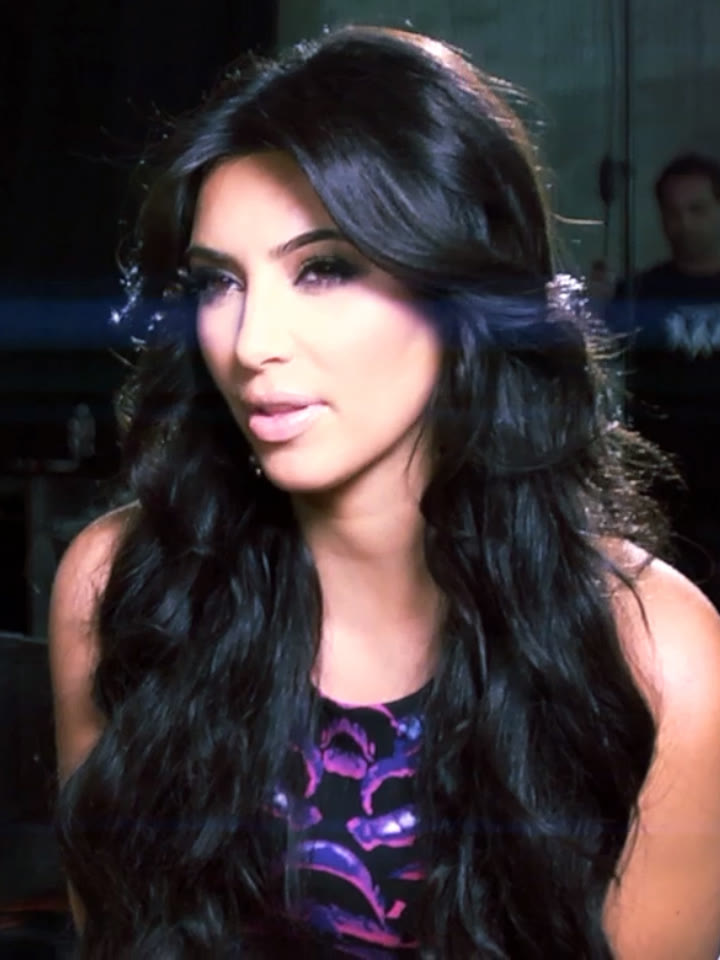
Kim Kardashian AI · 15–30s talking cameo
est. ≤15s · 3:4 portrait · 720p · lip-synced speech · no extra charge if longer
Cameo ideas
Popular Ways Fans Use a Kim Kardashian AI Cameo
Custom Kim Kardashian shoutouts turn quick jokes, birthdays, and team wins into sharable portrait clips nobody expects.
Bachelorette & Glam Brunch Reveal
Open a weekend trip group chat with iconic 'OMG guys we are literally going to Napa' voice energy.
Co-worker 'Get Up & Work' Tease
Tease a workaholic teammate or roommate in deadpan Calabasas cadence before Friday drinks.
Skincare & Mirror Selfie Captioning
Drop a playful fashion commentary clip alongside Dark Waves Evening Look or Cream Knit portraits.
Drama-Free Reality Confessional Joke
Script your group chat's harmless weekend recap like a solo reality-TV confessional interview.
Same category
More Cameos templates
 NEW100–400 CR
 NEW100–400 CR
 NEW100–400 CR
 NEW100–400 CR
 NEW100–400 CR
 NEW100–400 CR
 NEW100–400 CR
 NEW100–400 CR
 NEW100–400 CR
 NEW100–400 CR
 NEW100–400 CR
 NEW100–400 CR
How it works
How to Make Your Kim Kardashian AI Video in Four Steps
Zero face photos to upload—pick a Kim Kardashian portrait look, preview the voice free, write up to 400 characters, and generate.
Pick Your Portrait Look in Step 1
Click Dark Waves Evening Look or Cream Knit Studio Look in Step 1. Every selection swaps cleanly inside the right-hand Example preview window at crisp 3:4 portrait framing before you commit.
Sample the Voice and Write Your Script
Play the free Vocal-Fry Glam Calabasas Voice audio test in Step 2, then tap a quick starter or type up to 400 characters in Step 3. Messages under 200 characters stay at the 15s tier, while 201 to 400 characters use 30s.
Pick 720p HD or 480p and Generate
Leave 720p HD selected by default (200 credits for up to 15s; 400 credits for up to 30s) or toggle 480p Standard (100 or 200 credits). Even if generated speech runs slightly longer than estimated, zero extra credits are billed.
Script guide
Writing Natural Lines That Capture Kim Kardashian's Cadence
Conversational punctuation, short phrases, and matching portrait outfits elevate any spoken clip featuring this reality mogul & entrepreneur.
Channel cool Calabasas vocal drawl, deadpan glamorous commentary, and effortless reality poise into clean everyday dialogue
Great AI talking videos work because they sound like something Kim Kardashian would genuinely say into a front camera rather than a stiff teleprompter script. Lean toward cool Calabasas vocal drawl, deadpan glamorous commentary, and effortless reality poise with direct second-person openings like naming your friend right in the opening five words.
Spell out abbreviations and tricky inside-joke nicknames phonetically so the Fish Audio Vocal-Fry Glam Calabasas Voice model hits smooth emphasis from start to finish without rushing over unfamiliar initials.
Plan smoothly around 15-second and 30-second tiers
Keep scripts between 1 and 200 characters when crafting brisk Story openers, fantasy-league jabs, or birthday cards designed for mobile chats. Two or three tight sentences fit comfortably inside the 15-second estimation window.
Write 201 to 400 characters when building a multi-person wedding toast, office shoutout, or roast with a proper setup and punchline. Our workflow measures generated speech seconds automatically and prevents overage charges even when narration runs past 15s or 30s.
Match wardrobe tone and 720p detail to where you post
Choosing between Dark Waves Evening Look and Cream Knit Studio Look changes the mood before a word is spoken—swap looks inside the Example preview first so lighting and wardrobe fit your occasion, from party laughs to polished congratulations.
Use 480p Standard for lightweight group-chat jokes at 100–200 credits, and rely on default 720p HD whenever crisp eye clarity, clean garment edges, and living-room screen playback matter most.
Transparent 4-tier pricing
Simple Four-Tier Pricing Across 480p and 720p
No hidden per-second surprises: choose 480p (100/200 credits) or 720p HD (200/400 credits) with zero overage fees.
- Basic$9.90400 credits2 720p · 15s videos
- Growth$19.90850 credits4 720p · 15s videos
- Most PopularPro$39.901,800 credits9 720p · 15s videos
- Studio$99.904,800 credits24 720p · 15s videos
- Max$299.9015,000 credits75 720p · 15s videos
Popular searches
Related Search Ideas Around Kim Kardashian AI Cameos
Different ways creators describe personalized Kim Kardashian voice greetings and talking portrait videos.
Kim Kardashian AI voice cameo
Pairs unmistakable reality-TV inflection with clean front-facing portrait looks.
Bachelorette trip AI shoutout
Custom scripts referencing destinations, besties, and outfits sparkle in 15s clips.
Reality confessional video maker
No video clip uploads needed—type dialogue up to 400 characters and pick 480p or 720p.
Iconic glam birthday clip
Fixed credit billing covers extended 30-second scripts cleanly.
Ready captions
Captions to Pair With Your Kim Kardashian Cameo Clip
Copy a quick line when dropping the downloaded MP4 onto Reels, Shorts, Stories, or birthday threads.
- “Did not expect Kim Kardashian to drop in the group chat like this today.”
- “Happy birthday!! Even Kim Kardashian heard about tonight's celebration.”
- “Watch until the end—the cameo script did not hold back at all.”
- “Asked Kim Kardashian for one piece of advice and got roasted instead.”
- “Best birthday surprise sitting in My Work right before dinner.”
- “Dark Waves Evening Look vs. Cream Knit Studio Look—which look nailed the delivery better?”
- Mention the recipient's real name and one specific memory in your first sentence.
- Spell uncommon names simply so pronunciation stays natural on first try.
- Explore more [Celebrity AI Cameo Videos](/templates/cameos) for double-act party themes.
Write Your Kim Kardashian Cameo Script Now
Pick Dark Waves Evening Look or Cream Knit Studio Look, sample Vocal-Fry Glam Calabasas Voice free, and render your custom talking MP4 above.
FAQ
Kim Kardashian AI FAQ
Do I need to upload a face photo to make a Kim Kardashian AI cameo?
No. You choose directly between our preset Dark Waves Evening Look and Cream Knit Studio Look front-facing portraits in Step 1, test Vocal-Fry Glam Calabasas Voice free in Step 2, and type your script.
Why does the Example panel show portrait images instead of a looping video?
Clicking any look card previews the exact 3:4 portrait that WaveSpeed InfiniteTalk animates when generating your lip-synced Kim Kardashian cameo—keeping visual framing crystal clear before generation.
How does the 4-tier pricing work across 480p and 720p?
Character count sets your estimated length tier: 1–200 characters estimates up to 15s (100 credits at 480p Standard; 200 credits at 720p HD default), while 201–400 characters estimates up to 30s (200 credits at 480p; 400 credits at 720p).
Will I be charged extra credits if my speech runs longer than 15s or 30s?
Never. If synthesized voice playback slightly exceeds the 15-second or 30-second tier ceiling, our system bills strictly at your selected character tier without adding extra charges.
Can I hear what Kim Kardashian's cameo voice sounds like before paying?
Yes. Click Hear Vocal-Fry Glam Calabasas Voice sample in Step 2 to play a real Fish Audio preview directly in your browser at zero credit cost.
What happens if a generation task fails or times out?
Your credits are protected—any task that fails to produce a finished MP4 in My Work automatically triggers a full credit refund back to your account balance.
Keep scrolling
More viral AI video trends
 NEW100–400 CR
 NEW100–400 CR
 NEW100–400 CR
 NEW100–400 CR
 NEW100–400 CR
 NEW100–400 CR
 NEW350 CR
 NEW220 CR
 NEW380 CR
 NEW10 CR
 NEW320 CR
 NEW380 CR