
Music · New
APT Lip Sync AI Video Generator
Cast one or two portraits in our APT Lip Sync AI studio clip inspired by the ROSÉ & Bruno Mars hit. Get a 15-second 720p 16:9 MP4 with red drum kit energy, mic close-ups, and synced audio for 400 credits.
APT Lip Sync AI · 15s · 16:9
Fill Singer, Drummer, or both—each slot is optional; add at least one clear portrait to step into the 15-second hot-pink studio clip.
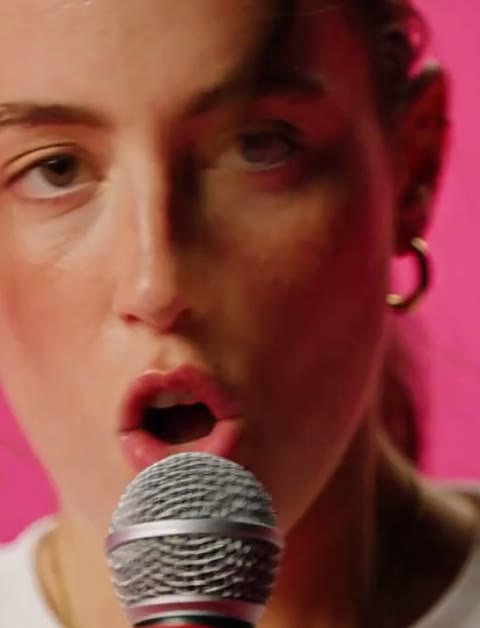
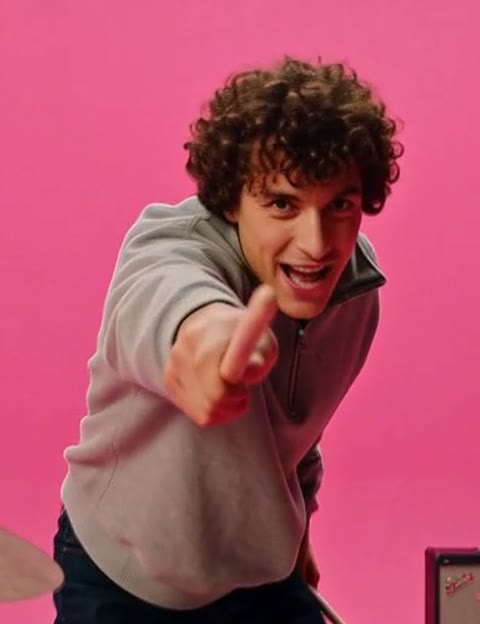
15s · 16:9 · 720p · authentic sound · ready in a few minutes
Examples
See the APT Lip Sync AI studio performance in action
Preview the 15-second hot-pink studio sequence that drives camera cuts, lip-sync timing, and duo blocking.
Hot-pink studio duo lip-sync
Opens on the red drum kit, cuts into a tight microphone lip-sync, drops overhead with red boxing gloves on the studio floor, and wraps with both performers chasing around the drums.
Same category
More Music templates
 NEW100–400 CR
 NEW320 CR
 NEW100–400 CR
 NEW380 CR
 NEW270 CR
 NEW270 CR
 NEW400 CR
 NEW400 CR
 NEW270 CR
 NEW100–400 CR
 NEW100–400 CR
 NEW100–400 CR
The scene
Every beat inside the 15-second APT Lip Sync AI clip
Kling 4.0 follows the exact five-beat editing arc from the studio clip so every chorus punch hits cleanly.
0–1s · Studio wide intro and snare hit
The camera opens wide across the hot-pink studio wall lined with vintage guitar amplifiers before punching straight onto crisp red tom and snare hits.
1–5s · Handheld mic close-up and kneeling vocal
The Singer leans right into the silver handheld microphone for a tight chorus lip-sync, then drops to both knees in bright red boxing gloves in front of the kit while the Drummer keeps time behind.
5–8s · Overhead pink-floor chorus belt
A high overhead angle frames the Singer stretched across the glossy pink floor with red boxing gloves spread wide, belting directly upward into the lens.
8–12s · Playful chase around the drum kit
Both performers sprint in a quick circle around the red drum set across the seamless pink backdrop, bringing kinetic band-rehearsal chaos to the bridge.
12–15s · Point-to-camera finale
Back at the kit, the Drummer leans forward over the red drums and points straight into the lens on the closing hook while the Singer grooves right behind.
Who to put in
Best pairings for APT Lip Sync AI
Both Singer and Drummer slots stay optional, so any duo—or a solo portrait beside the studio partner—works.
Best friends or roommates
Put the loudest singer on the handheld microphone and cast your deadpan friend behind the red drum kit for instant rehearsal-room comedy.
Coworkers, founders, or classmates
Pair two contrasting colleagues in front of the pink wall—office contrasts and serious portraits make the energetic chorus even funnier.
Couples or siblings
Turn anniversary snapshots or sibling throwbacks into a 15-second music-video duet complete with boxing-glove vocals and drum fills.
Pets or solo takeovers
Fill just one slot with yourself or a front-facing cat or dog portrait while the second performer holds down the studio groove beside you.
Photo tips
Photo tips for crisp APT Lip Sync AI faces
Fast camera cuts and tight mic close-ups track eyes, mouth motion, and hairlines closely across all 15 seconds.
- Upload one separate solo portrait per slot so Singer and Drummer stay cleanly anchored to their own roles without blending.
- Pick bright, front-facing photos with clear eyes, uncovered mouths, and natural lighting across the forehead and cheeks.
- Choose two people with distinct hairstyles, glasses, or outfits when casting a duo so rapid cuts never swap identities.
- Leave a comfortable margin above the head and around the shoulders so overhead floor shots keep proportions balanced.
- Two-person group shots in one upload box, dark sunglasses, heavy motion blur, or hands covering the lower face.
How it works
How to make your APT Lip Sync AI video
Skip green screens, editing timelines, and prompt engineering—cast one or two photos and render in minutes.
Pick Singer, Drummer, or both
Drop clear JPG, PNG, or WebP portraits under 20 MB into either role slot. Leave one slot blank anytime if you only want to swap a single performer.
Render with Kling 4.0
Hit generate and Kling 4.0 maps your uploaded portraits onto the 15-second 16:9 studio sequence—preserving lip-sync timing, camera sweeps, and pink backdrop lighting automatically.
Save your 720p MP4 with audio
Download the watermark-free 15-second 720p 16:9 MP4 from My Work with the matching audio track already mixed in and ready to share.
Photos: JPG, PNG, WebP, up to 20 MB.
Origin
Where the APT Lip Sync AI trend came from
From a Korean party chant and a pink-walled pop MV to one of the biggest duo lip-sync formats online.
The ROSÉ & Bruno Mars music video
Released on October 18, 2024, "APT." by ROSÉ and Bruno Mars (official music video on YouTube, Wikipedia) draws its hook from the Korean drinking game *Apateu* (아파트), where players stack hands and chant the rhythmic chorus.
Shot in a saturated hot-pink studio with a red drum kit, vintage amplifiers, handheld microphones, and playful camera cuts, the visual setup became instantly recognizable even in silent frames.
How TikTok and AI duo remixes took over
Within days of release, fans began recreating the pink-studio lip-sync and drum-kit duet across TikTok, YouTube Shorts, and CapCut templates (Know Your Meme). Creators soon started swapping friends, pets, and public figures into the Singer and Drummer roles using AI video generators.
Ready to star in APT Lip Sync AI?
Upload one or two portraits and generate your 15-second 720p 16:9 APT Lip Sync AI video with synced sound for 400 credits.
FAQ
APT Lip Sync AI FAQ
How many photos do I need for APT Lip Sync AI?
You need 1 or 2 clear portraits to create an APT Lip Sync AI video. Both Singer and Drummer slots are optional, so you can cast two different people together or upload a single photo and keep the original co-performer in place.
Which slot should I upload to—Singer or Drummer?
In APT Lip Sync AI, Singer casts the front mic vocalist and Drummer casts the kit performer. The Singer wears a white tee and red boxing gloves in mic close-ups and overhead floor shots, while the Drummer plays behind the red drum kit and points at the camera.
Should I upload a couple selfie or two separate solo photos?
Always upload two separate solo photos—one face per slot—for APT Lip Sync AI. Placing a single portrait in each box lets Kling 4.0 bind each identity cleanly to its matching role across fast camera cuts.
How long is the output video and how many credits does it cost?
Each APT Lip Sync AI video runs 15 seconds in 720p 16:9 widescreen MP4 and costs 400 credits. You can browse credit packs and plans on our pricing page, and commercial usage rights are included.
Why is APT Lip Sync AI rendered in 16:9 widescreen?
APT Lip Sync AI renders in 16:9 widescreen so the red drum kit and both performers fit in frame. Keeping the horizontal frame preserves wide studio tracking shots, guitar amplifiers, and overhead angles intact.
Does the downloaded MP4 already include audio?
Yes, every APT Lip Sync AI MP4 includes the synced soundtrack automatically. Your finished 720p file is watermark-free and ready to download from My Work for YouTube, X, Reels, or TikTok.
Can I put pets or illustrated characters into APT Lip Sync AI?
Yes, you can put pets or illustrated characters into APT Lip Sync AI alongside human portraits. Clear front-facing eyes and well-lit facial features keep the character consistent across every cut.
What happens if a generation fails?
Credits for any failed APT Lip Sync AI video return to your balance automatically. You can retry right away with the same photos or swap in a sharper portrait.
Keep scrolling
More viral AI video trends
 NEW380 CR
 NEW300 CR
 NEW350 CR
 NEW400 CR
 NEW400 CR
 NEW380 CR
 NEW400 CR
 NEW220 CR
 NEW380 CR
 NEW10 CR
 NEW320 CR
 NEW100–400 CR