
Effects · New
Opa Opa Opa AI Video Generator
Submit 1 front-facing portrait or selfie to launch your hair straight up like a coiled spring on every beat with the Opa Opa Opa AI Video Generator. Render a 12-second 9:16 vertical 720p bounce hair clip synced to "Ty Zalip (Opa Opa Op)" by PAPAKLEY and DJ Shiza for 320 credits.
Opa Opa Opa AI · 12s · 9:16
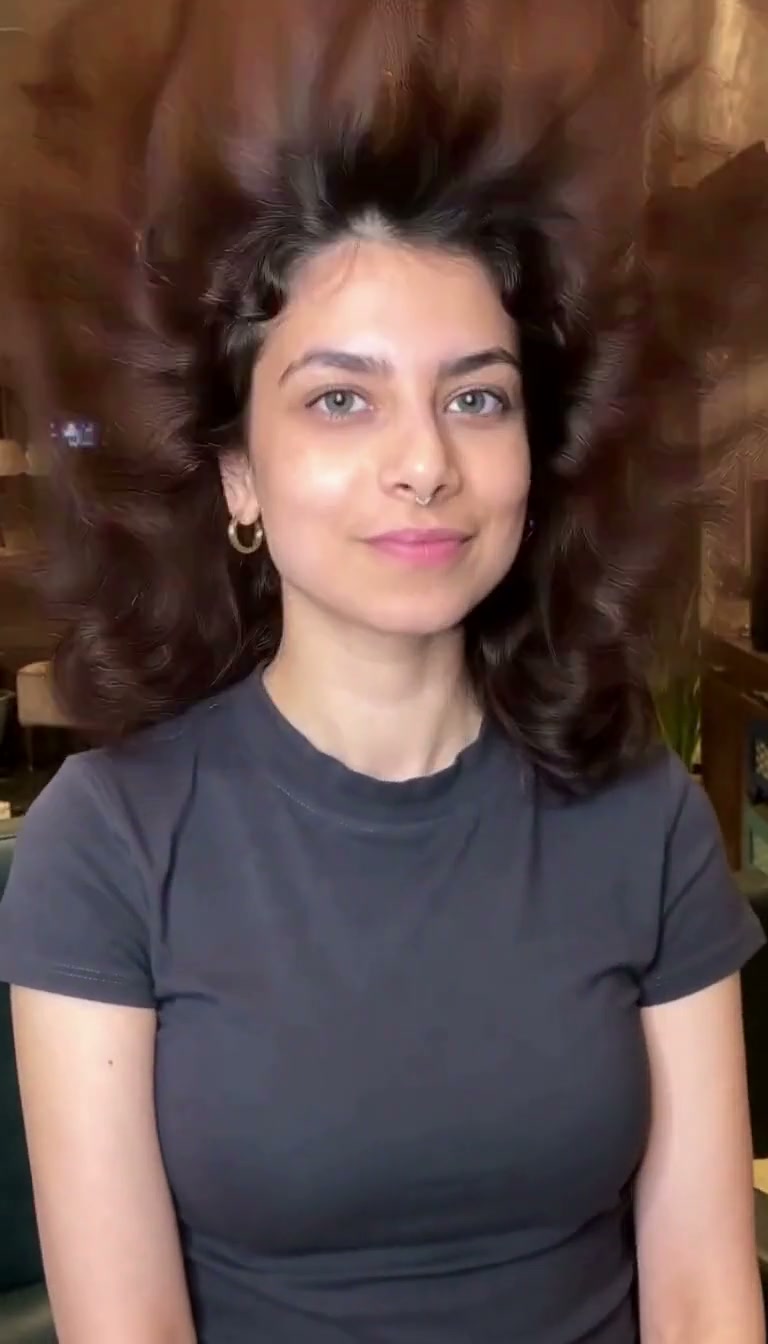
12s · 9:16 · 720p · original sound · ready in a few minutes
Bounce Hair Showcase
See how Opa Opa Opa AI turns one portrait into a spring-loaded hair bounce
From the calm six-second warm-up sway to the explosive vertical hair spring on the "Slish, ti zalip, opa-opa-op" drop—plus live selfie hair-flip variations—watch how Opa Opa Opa AI animates real hairstyles in 720p for the Opa Opa Opa trend.
Fringe & shoulder curls erupt into a vertical coil spring (Primary Reference)
Across this 12.0-second 9:16 Opa Opa Opa AI reference video, a woman in a fitted charcoal-grey crew-neck t-shirt and small gold hoop earrings smiles gently for the opening 6.0 seconds with wavy brown curls and bangs resting on her shoulders, then launches her entire head of hair 30 centimeters straight upward like an uncompressed spring on every "opa" beat from 6.0 to 12.0 seconds.
@xbus2604105020Long waves full-spring vertical coil bounce from beat one
Across twelve continuous seconds in 9:16 portrait framing, long layered waves above a white sleeveless top shoot straight toward the top edge of the frame, fan out into a wide bouncy hair halo, and snap back down to the shoulders in rhythm while the face and smile stay steady.
@user2974777569040Short black bob with straight bangs selfie bounce
Filmed against a clean white wall in a striped zip-up hoodie, this 7-second clip shows how a chin-length black bob and full fringe pop outward and upward with every head turn and rhythm hop.
@_defiantpandaWarm indoor long dark hair selfie jump & toss
Representing the live-action Opa Opa Op jump branch (397.6K views), a creator in a white long-sleeve top bounces on the spot under warm bedroom lighting so her long straight dark hair floats upward and whips across her shoulders on every beat.
@jaquelinearagonnSame category
More Effects templates
 NEW270 CR
 NEW240 CR
 NEW140 CR
 NEW270 CR
 NEW140 CR
 NEW270 CR
 NEW140 CR
 NEW140 CR
 NEW400 CR
 NEW270 CR
 NEW140 CR
 NEW190 CR
Timeline Breakdown
Second-by-second spring hair progression inside your 12-second Opa Opa Opa AI clip
The Opa Opa Opa AI Video Generator stages a deliberate two-half comedic contrast across 12.0 seconds—building calm anticipation during the opening electronic intro before unleashing the full vertical hair spring at the 6.0-second vocal drop.
0.0s – 3.0s: Centered chest-up portrait & relaxed intro sway
Your 12-second vertical video opens in a softly lit modern lounge with warm amber cove lighting behind the subject. Wearing a fitted charcoal-grey crew-neck short-sleeve t-shirt and small gold hoop earrings, the person from your uploaded photo faces straight into the fixed eye-level lens with their hair resting naturally and smoothly down over their shoulders and forehead, smiling warmly while swaying their head slightly to the opening synth rhythm.
3.0s – 6.0s: Pre-drop beat build & steady eye-contact lock
As the electronic bassline accelerates toward the Russian vocal hook, the subject remains anchored in the exact center of the chest-up 9:16 frame. Their shoulders pulse gently with the tempo, their natural hair tips brush softly against the collarbones of the charcoal-grey t-shirt, and their eyes hold a playful, knowing grin straight into the camera.
6.0s – 9.0s: The 6.0s "Opa Opa Op" beat drop & 30 cm vertical hair eruption
Right at 6.0 seconds when the sped-up vocal hook ("Slish, ti zalip, opa, opa, op!") hits, the visual punchline triggers: while the person’s face, warm smile, and charcoal-grey t-shirt stay completely steady in place, their entire head of hair—from the front fringe to the shoulder-length curls—shoots straight upward 30 centimeters above their crown like a released coil spring, fanning into a huge weightless halo before snapping back down on the beat.
9.0s – 12.0s: Rapid-fire coil rebounds & smiling finale
Through the final three seconds of the chorus, every consecutive "opa, opa, op" beat launches the bouncy hair straight up toward the top border of the 9:16 frame and pulls it briskly back to the shoulders in elastic waves. The subject maintains crisp facial identity, zero head blur, and an effortless smile right up to the clean 12.0-second cutoff.
Input & Output Specs
Single-photo input requirements and Opa Opa Opa AI Video Generator output specs
Powered by Kling 4.0 start-and-end keyframe synthesis, every Opa Opa Opa AI render locks your facial identity across both the calm pre-drop portrait and the high-flying bounce hair state without watermark bleed or tutorial tails.
You upload
- 1 clear front-facing portrait or chest-up selfie (JPEG, PNG, or WebP up to 20 MB, at least 300 px on the shortest side).
- Works with long straight hair, wavy curls, short bobs with bangs, ponytails, afros, or even a short comb-over—as long as your hair is uncovered and visible.
- No text prompt writing, no timeline keyframing, and no mobile template hunting required.
You get
- A 12.0-second 9:16 vertical 720p MP4 clip (768 × 1344 px) where your hair stays calm for the first 6.0 seconds and erupts into a rhythmic vertical coil spring from 6.0 to 12.0 seconds.
- Dual-keyframe identity fidelity: Keyframe 1 locks your natural resting hairstyle and facial geometry; Keyframe 2 anchors the peak 30-centimeter upward hair expansion while keeping your face and outfit rock-steady.
- The sped-up "Ty Zalip (Opa Opa Op)" electronic soundtrack merged directly with the silent Kling 4.0 visual track, compressed below 3 MB for instant social sharing.
| Synthesis Mode | Kling 4.0 Start & End Keyframe Interpolation |
|---|---|
| Source Photo | 1 front-facing solo portrait or selfie |
| Clip Length | 12 seconds (0–6s calm sway, 6–12s spring hair bounce) |
| Frame Geometry | 9:16 vertical (768 × 1344 pixels) |
| Render Quality | Native 720p HD (no upscale surcharge) |
| Soundtrack Pipeline | Silent visual pass + "Ty Zalip (Opa Opa Op)" remux |
| Export Package | MP4 under 3 MB, free of watermarks and tutorial UI |
| Credits | 320 per video, refunded if it fails |
Cast Ideas
Four portraits that make the funniest Opa Opa Opa AI hair bounce
Because the face and shoulders stay composed while only the hair loses gravity at 6.0 seconds, the contrast works on glamorous selfies and deadpan family portraits alike.
Your best salon blowout or curly hair selfie
Take that camera-roll selfie where your curls, fringe, or layered blowout looked picture-perfect and let the 6.0-second beat drop launch the entire hairstyle straight toward the ceiling on every "opa".
The friend with big curls or waist-length waves
Drop a friend’s portrait into the Opa Opa Opa AI Video Generator and post the 12-second clip into the group chat—the first six seconds look like normal portrait motion before their hair suddenly boings a foot into the air.
Dad’s serious ID photo or comb-over portrait
The stiffer and more serious the facial expression, the funnier the 6.0-second beat drop becomes when a neat side part, short crop, or classic comb-over erupts upward like a mechanical watch spring.
Cosplay wigs, anime-inspired looks & glamorous dress-ups
Test vibrant dyed hair, twin-tails, bangs, or styled cosplay portraits to recreate the high-energy Opa Opa Opa trend without having to jump up and down in front of a mirror for twenty takes.
How It Works
Three steps to create your Opa Opa Opa AI bouncy hair video online
Everything runs directly in your browser—no mobile editing apps to install, no screen-recorded tutorial tails to trim, and no custom prompts to write.
Upload 1 clear front-facing photo
Pick a solo portrait or selfie framed from the chest or shoulders up with your face looking toward the camera and your hair uncovered.
Generate keyframes & 12-second Kling 4.0 motion
Click Generate (320 credits). Our Opa Opa Opa AI Video Generator synthesizes your calm pre-drop portrait keyframe and your peak vertical spring-hair keyframe, then renders the 12-second 720p clip.
Download your 720p MP4 with synced Opa Opa Op audio
Preview and download your finished 9:16 vertical MP4 under 3 MB—complete with the "Ty Zalip (Opa Opa Op)" audio track already merged and ready to share.
Photos: JPG, PNG, WebP, up to 20 MB.
Photo Guide
Photo tips for the cleanest spring hair bounce in Opa Opa Opa AI
Follow these framing guidelines so our Kling 4.0 keyframe workflow preserves your exact facial features while giving your hair plenty of room to spring upward.
- Use a front-facing chest-up or shoulders-up photo with a small margin of space above the crown of your head so the 30-centimeter upward hair bounce stays fully inside the frame.
- Keep your hair loose and uncovered—curls, waves, straight bangs, bobs, and shoulder-length layers produce the most dramatic vertical fan-out at the 6.0-second beat drop.
- Choose even indoor or daylight illumination where both eyes, eyebrows, nose bridge, and hairline are sharp and unobstructed.
- Avoid baseball caps, beanies, pulled-up hoodies, helmets, or tightly slicked buns that hide your hair volume.
- Skip group photos with multiple faces, heavy sunglasses covering your eyes, or tightly cropped forehead shots where the top of your head is cut off.
Trend Origin & History
Where the "Slish Ti Zalip, Opa Opa Op" Russian bounce hair trend came from
How a 2018 Russian electronic track by PAPAKLEY and DJ Shiza evolved into late-2026’s viral selfie jump and AI spring-hair phenomenon.
From PAPAKLEY & DJ Shiza’s "Ty Zalip" to the 2026 Opa Opa Op craze
The infectious audio driving the Opa Opa Opa trend is a sped-up club cut of "Ты залип" ("Ty Zalip"), an electronic dance single originally released in August 2018 by Russian producers PAPAKLEY and DJ Shiza (official YouTube audio and the 2.8M-view Slowed + Reverb mix on YouTube). Its vocal hook—"Слышь, ты залип? Опа, опа, оп" (romanized by international fans as "Slish, ti zalip, opa-opa-op", meaning "Hey, you zoned out? Whoop, whoop, whoop!")—pairs a deadpan spoken callout with a punchy, elastic bass bounce.
Between September and November 2026, the sped-up sound exploded across short-form video feeds in three distinct waves. First came live-action selfie bounce videos led by creators like @hiro.tnn on TikTok (676.7K views), @jaquelinearagonn on TikTok (397.6K views), and @_defiantpanda on X (66.2K views), who hopped on the spot so their hair tossed up and down like jelly. Soon after, 2D and anime editors such as @square.animations6 on TikTok (326.6K views), @lexgae on TikTok (318.8K views), and @aniaura_tv on TikTok (189.8K views) adapted the beat into looping character jump memes.
By late October 2026, the meme spawned its biggest AI branch: the single-photo "Russian Bounce Hair Effect" popularized by posts from @xbus2604105020 on TikTok (364.4K views) and @user2974777569040 on TikTok (237.0K views), where a still portrait suddenly launches its hair straight up like a coiled watch hairspring on every "opa" beat.
Why our Kling 4.0 Keyframe-to-Video pipeline beats screen-recorded templates
If you scroll through social media uploads of the bounce hair trend, most clips cut away after 8 seconds to show a hand holding a stylus tapping a physical phone on a desk—attaching 9 to 15 seconds of unwanted app tutorial clutter to the end of the video. Other single-pass video generators warp the person’s eyes and mouth whenever the hair stretches upward.
The Opa Opa Opa AI Video Generator solves both problems. First, we use a clean, unbroken 12.0-second 720p reference scene with zero tutorial tails or watermarks. Second, because the camera is fixed and the comedy relies on the dramatic visual contrast between calm resting hair (0.0–6.0s) and vertical spring-loaded hair (6.0–12.0s), our Kling 4.0 keyframe workflow generates two locked portrait frames from your uploaded image before interpolating the 12-second bounce hair motion. Explore more viral effects across our AI video effects templates, funny AI video templates, AI dance video templates, and AI music video templates.
FAQ
Opa Opa Opa AI FAQ
What is the Opa Opa Opa AI bounce hair trend?
The Opa Opa Opa AI bounce hair trend turns one portrait photo into a 12-second vertical video where your hair shoots straight up like a coiled spring on every beat. Known across social feeds as the Russian Bounce Hair Effect, Hair Spring Effect, or Slish Ti Zalip Opa Opa Opa trend, it keeps your face and shoulders composed for the first 6.0 seconds before launching your hairstyle 30 centimeters upward from 6.0 to 12.0 seconds.
Why does Opa Opa Opa AI use Kling 4.0 Keyframe-to-Video mode?
Opa Opa Opa AI uses Kling 4.0 First-and-Last Keyframe-to-Video mode to lock your facial identity, eye shape, and charcoal-grey t-shirt across two pre-rendered keyframes with zero watermark bleed. Because this fixed-camera portrait meme relies on the dramatic contrast between calm resting hair (0.0–6.0s) and vertical spring hair (6.0–12.0s) rather than full-body dance steps, dual-keyframe interpolation prevents facial warping when your hair stretches upward.
What song plays in the Opa Opa Opa AI video, and is the audio included?
Yes, your downloaded 12-second MP4 includes the sped-up "Ty Zalip (Opa Opa Op)" electronic soundtrack originally created by Russian duo PAPAKLEY and DJ Shiza. We feed a silent reference video into Kling 4.0 during visual generation and automatically remux the clean master audio track onto your finished 720p video.
What kind of photo works best for the Opa Opa Opa AI Video Generator?
Upload 1 clear, front-facing chest-up portrait or selfie (JPEG, PNG, or WebP up to 20 MB) where your hair is uncovered and visible. Curls, long waves, straight bangs, bobs, and even short hairstyles all work well; avoid hats, pulled-up hoodies, sunglasses, or group photos.
Does the finished video contain tutorial screen recordings or watermarks at the end?
No—every 12.0-second Opa Opa Opa AI video is trimmed strictly to the core portrait performance, delivering a watermark-free 720p MP4 under 3 MB with zero tutorial tails. Unlike social media reposts that cut to a stylus tapping a phone screen after eight seconds, our reference timeline ends cleanly on the final spring hair bounce.
How many credits does one Opa Opa Opa AI video cost?
Creating one 12-second 720p bouncy hair clip with the Opa Opa Opa AI Video Generator costs 320 credits. That price follows SameVid AI's standard 15-second = 400-credit ratio (320 credits for 12 seconds, with native 720p HD included and no upscale fee), and you can top up anytime on our pricing page.
What happens if generation fails, and what similar templates can I try next?
If a render ever fails, all 320 credits are automatically returned to your account balance right away. For more single-photo viral effects and rhythmic trends, try Skull Cap AI, Baby Podcast AI, Birthday Wife AI, Up Up Dance AI, or browse the SameVid AI video templates library.
Keep scrolling
More viral AI video trends
 NEW270 CR
 HOT270 CR
 NEW300 CR
 NEW400 CR
 NEW350 CR
 NEW380 CR
 NEW320 CR
 NEW400 CR
 NEW300 CR
 NEW350 CR
 NEW400 CR
 NEW240 CR