
Christmas · New
Christmas Gift AI Video Generator
Upload one clear front portrait for Christmas Gift AI: you stand before a glowing Christmas tree as sunglasses-wearing Santa steps in and hands you a fan of crisp cash in a 5-second 720p 9:16 video with sound for 140 credits.
Christmas Gift AI · 5s · 9:16
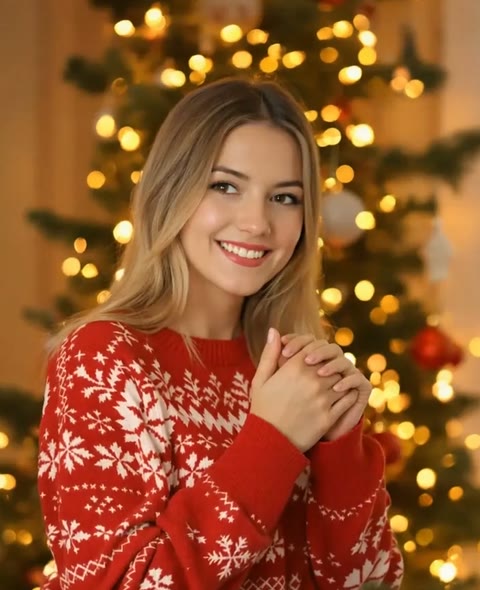
5s · 9:16 · 720p · original sound · ready in a few minutes
Who to put in
Best people to star in your Christmas Gift AI video
One clear front-facing photo puts almost anyone into the surprise Santa cash reveal beside the glowing holiday tree.
Yourself for a holiday status update
Drop in a bright front selfie to joke with friends about what really sits at the top of your December wishlist. The five-second beat reads immediately in group chats, Stories, and festive countdown posts.
A friend or Secret Santa coworker
Surprise a colleague or best friend with a custom Christmas Gift AI clip before the office gift exchange. Pair the finished video with a real gift card or a playful note inside your team channel.
Siblings, parents, or college roommates
Use a clean portrait of a family member who always asks for "something practical" every December. Watching sunglasses-wearing Santa walk in with a fan of bills turns an inside joke into a shareable holiday card.
Your favorite holiday-sweater portrait
Already have a cozy knit sweater photo or winter market snapshot? Kling 4.0 keeps your face, hairstyle, and outfit styling consistent while blending you naturally into the warm fairy-light glow of the tree.
Same category
More Christmas templates
 NEW140 CR
 NEW400 CR
 NEW270 CR
 NEW100–400 CR
 NEW400 CR
 NEW300 CR
 NEW140 CR
 NEW400 CR
 NEW380 CR
 NEW400 CR
 NEW400 CR
 NEW400 CR
How it works
How to make a Christmas Gift AI video in 3 steps
No prompt writing, timeline editing, or green screen required—just one portrait and a few minutes of cloud rendering.
Upload one clear portrait
Drop a well-lit front photo into the single upload slot above. SameVid accepts JPG, PNG, and WebP images up to 20 MB, with head-and-shoulders or waist-up framing working cleanly.
Start the Kling 4.0 render
Click the generate button to queue your 5-second Christmas Gift AI clip for 140 credits. Kling 4.0 references the silent 5-second timing, warm tree lighting, and comedic Santa entrance while preserving your likeness.
Download with festive audio
Once rendering finishes in a few minutes, SameVid automatically merges the original festive audio track onto your 720p 9:16 MP4 so it is ready to post straight to vertical feeds or family chats.
Photos: JPG, PNG, WebP, up to 20 MB.
Origin
Where the Christmas Gift AI video trend came from
Seasonal AI holiday cards exploded into short-form video after late-2025 Santa gift reveals took over December feeds.
From cursed holiday memes to personalized Santa gift videos
AI-generated Christmas gift humor first caught fire online in December 2023 when a viral gag image of a family laughing at a crying child opening a sarcastic present swept social feeds and inspired waves of holiday remix posts, documented by Know Your Meme.
Each November and December since, creators have returned to playful holiday transformations—ranging from giant gift-box portraits to funny Santa drop-ins—because a single selfie can be turned into a festive joke in minutes.
The December 2025 AI Santa gift boom
Interest surged again in December 2025 when a viral gift-emoji holiday easter egg turned everyday selfies into personalized Sora-powered Santa gift clips across social feeds, covered by 9to5Mac and Mashable.
SameVid builds on that festive surprise format with a fast 5-second vertical scene: instead of waiting through a long monologue, sunglasses-wearing Santa strides straight into frame beside the glowing tree and hands you a fan of crisp cash.
Photo tips
How to pick the best photo for Christmas Gift AI
Clean facial detail and even indoor lighting help Kling 4.0 lock your identity from the opening clap to the cash-gift smile.
- Use a sharp front-facing portrait where your eyes, nose, mouth, and hairline are fully visible and centered.
- Choose a head-and-shoulders or waist-up shot with relaxed shoulders so the clapping and two-handed cash grab look natural.
- Pick a photo with soft, even front lighting—warm indoor light or daylight near a window blends seamlessly with the golden Christmas tree lights.
- Feature a single clear person in the frame so Kling 4.0 maps the entire protagonist role cleanly to you while leaving room on the left for Santa.
- Wear a cozy sweater, casual top, or festive outfit if you want your real-life wardrobe carried into the final holiday clip.
Ideas
Fun ways to use your finished Christmas Gift AI clip
A punchy five-second punchline fits naturally into December group chats, digital cards, and short-form vertical feeds.
Digital holiday card opener
Send the MP4 in your family WhatsApp, iMessage, or Discord thread instead of a plain text greeting. The instant sunglasses-Santa entrance gets a laugh within the first two seconds.
Secret Santa reveal teaser
Drop the clip into your office or friend-group chat right before handing out real presents, joking that Santa already settled your holiday wishlist in cash.
Holiday countdown Story or Reel
Post the vertical 9:16 video with a short caption about your December wish list, year-end bonus hopes, or "Dear Santa, keep it simple this year."
Pair with our other festive templates
Build a mini December highlight reel by combining this reveal with [Catch Santa Chimney AI](/template/catch-santa-chimney-ai), [Christmas Dance AI](/template/christmas-dance-ai), or [Christmas Photobooth AI](/template/christmas-photobooth-ai) from our [Christmas AI Video Templates](/templates/christmas) collection.
Specs
What goes in and what comes out
Every Christmas Gift AI render uses the exact same 5-second vertical reference timing and remuxes the original festive audio.
You upload
- 1 clear front portrait (JPG, PNG, or WebP up to 20 MB)
- Head-and-shoulders or waist-up framing with even lighting
You get
- 1 vertical 9:16 MP4 at 720p resolution with original festive sound
- 5-second single-shot reveal featuring your likeness and sunglasses Santa beside a glowing Christmas tree
| Photos | 1 |
|---|---|
| Model | Kling 4.0 |
| Duration | 5 seconds |
| Picture | 720p, 9:16 |
| Audio | Original festive sound remuxed |
| File | MP4 |
| Credits | 140 per video, refunded if it fails |
Ready for Santa’s surprise cash drop?
Upload one clear portrait to generate your 5-second 720p Christmas Gift AI video with sound for 140 credits.
FAQ
Christmas Gift AI FAQ
How many photos do I need for Christmas Gift AI?
Just one clear front-facing photo. Upload a single head-and-shoulders or waist-up portrait into the slot above, and Kling 4.0 places you beside the glowing Christmas tree while sunglasses-wearing Santa walks in with the cash gift.
How long is the generated Christmas Gift AI video and what resolution is it?
Every render produces a 5-second vertical 9:16 MP4 at 720p resolution, matching the exact length and framing of the preview clip above so you know what pacing to expect before you generate.
How many credits does Christmas Gift AI cost?
One 5-second 720p render costs 140 credits, scaled proportionally from our standard 15-second rate. Your exact credit cost and USD equivalent are displayed directly on the generate button before you start, and you can compare credit packs on our Pricing page.
Does the finished video include sound?
Yes. Kling 4.0 renders clean visuals from a silent reference pass, and SameVid automatically remuxes the original festive audio track onto your finished MP4 before delivery.
What kind of photo gives the cleanest face match?
A sharp, evenly lit front portrait with your face unobstructed and centered gives the strongest likeness. Soft indoor lighting or window daylight blends most naturally with the warm golden glow of the Christmas tree.
How long does rendering take?
Most Christmas Gift AI videos finish in a few minutes in the cloud. You can watch progress right inside the result panel or check your generation history once the MP4 is ready to download.
Can I use my own Christmas sweater or casual outfit in the photo?
Yes. Because Kling 4.0 references your uploaded portrait for your face, hair, and styling, wearing a red knit sweater, winter coat, or favorite holiday outfit carries smoothly into the finished scene.
Keep scrolling
More viral AI video trends
 NEW160 CR
 NEW320 CR
 NEW270 CR
 NEW400 CR
 NEW400 CR
 NEW320 CR
 NEW240 CR
 NEW220 CR
 NEW380 CR
 NEW10 CR
 NEW320 CR
 NEW100–400 CR