
Funny · New
Catch the Grinch AI Video Generator
Upload one photo of your living room, bedroom, or kitchen to catch the Grinch sneaking in, snooping around, laughing at the lens, and scurrying away in a 10-second 720p 9:16 video with sound for 270 credits.
Catch the Grinch AI · 10s · 9:16
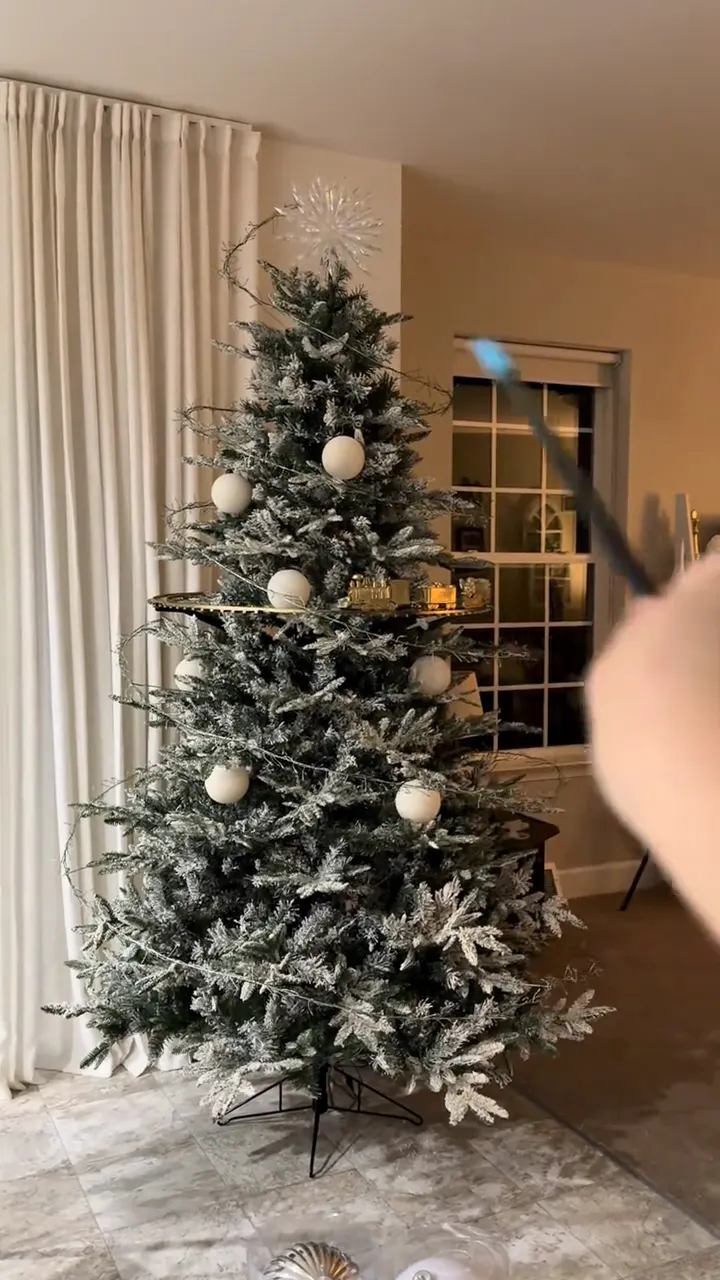
Upload 1 clear photo of your living room, bedroom, or kitchen. Kling 4.0 keeps your room intact while the Grinch sneaks in, snoops around, laughs at the camera, and scurries away.
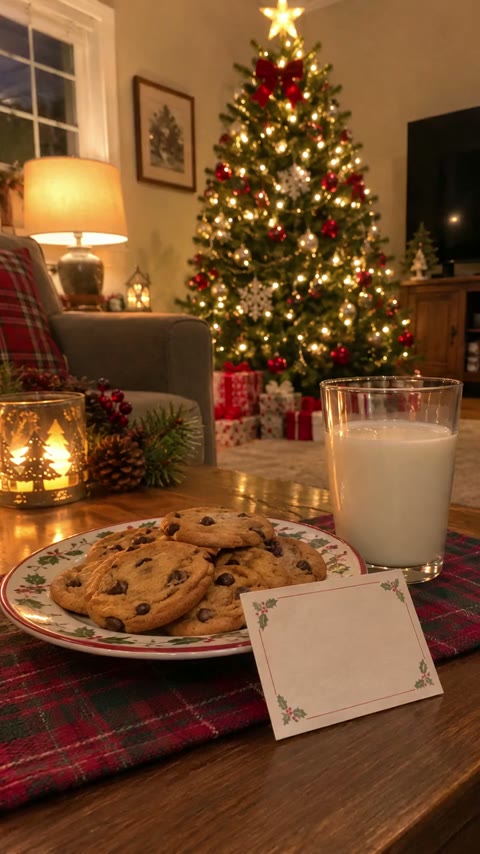
10s · 9:16 · 720p · original sound · ready in a few minutes
Scene Breakdown
Five beats inside the 10-second Catch the Grinch AI video
Kling 4.0 brings the Catch the Grinch AI prank directly into your real room photo with natural table shadows, warm holiday lighting, and five comedic beats.
0.0s – 2.0s · Quiet Room & Doorway Peek
Your Catch the Grinch AI clip opens on your uploaded room photo, quiet and undisturbed from the exact same camera angle. Seconds in, a bright-green furry head in a plush crimson Santa coat peeks slyly around the doorway or frame edge, yellow eyes scanning the room.
2.0s – 5.0s · Tiptoe Snooping Around Your Room
Tiptoeing in on bent knees, the Grinch snoops through your real furniture with long green clawed fingers: he lifts a cushion, peeks behind the couch or bed, and picks up a small object from a shelf or table to inspect it.
5.0s – 6.0s · Caught-on-Camera Freeze
Then he freezes mid-snoop and slowly turns his head when he realizes the camera is recording him.
6.0s – 7.5s · Mischievous Camera Laugh
Instead of panicking, the Grinch leans toward the lens with a wide, cheeky grin and lets out a playful holiday cackle as his red velvet coat and white faux-fur collar bounce in the warm room light.
7.5s – 10.0s · Low Crouch Escape
Dropping into a low tiptoe crouch in black boots, the Grinch turns his back to the lens and scurries out the way he came, leaving the room exactly as it was for a clean ending.
Same category
More Funny templates
 NEW270 CR
 NEW350 CR
 NEW240 CR
 NEW220 CR
 NEW270 CR
 NEW400 CR
 NEW270 CR
 NEW220 CR
 NEW400 CR
 NEW240 CR
 NEW320 CR
 NEW270 CR
Prank & Family Ideas
Who and what to capture for your Catch the Grinch AI clip
One real snapshot of your own home makes the Catch the Grinch AI prank land—kids and friends recognize their actual couch, bed, and decorations.
Parents Showing Kids "Proof" on Christmas Morning
Leave cookies and milk by the tree on Christmas Eve, snap one quick photo before bed, and play your Catch the Grinch video in the morning without renting a costume or scaring toddlers in person.
Roommates & Partner Holiday Pranks
Take a photo of your partner’s freshly baked cookies or neatly stacked presents under the tree, then drop the 10-second Catch the Grinch AI clip in the group chat asking who left the living room camera on overnight.
Fireplace Mantel & Stocking Check-Ins
Aim your phone across the hearth and hanging stockings with warm evening lamps lit. The Grinch creeps into the foreground while your exact mantel decor and tree lights stay intact in the background.
Office Secret Santa & Party Teasers
Snap the office breakroom tree or holiday snack table to make a quick 9:16 Reel where colleagues catch the Grinch raiding the missing gingerbread cookies and Secret Santa boxes.
How It Works
How to make a Catch the Grinch AI video in three steps
Skip green-screen cutouts, static stickers, and manual prompts—upload one clear room photo to create your Catch the Grinch AI prank video.
Upload one clear photo of your room
Snap a vertical photo of your living room, bedroom, or kitchen in JPG, PNG, or WebP (up to 20 MB). Leave some open floor space and a visible doorway so the Grinch has room to sneak in naturally.
Click Generate and let Kling 4.0 stage the sneak-in
SameVid pairs your room photo with our built-in Grinch character and Kling 4.0 Reference-to-Video animates the whole 10-second prank inside your room. There are no prompts to write and no stickers to align by hand.
Download your 720p vertical MP4 with prank audio
Within a few minutes, your finished 9:16 Catch the Grinch AI clip appears in My Work with original prank audio remuxed cleanly on top and zero watermarks—ready to show your kids or post to Reels, Shorts, or Stories.
Photos: JPG, PNG, WebP, up to 20 MB.
Room Photo Guide
Photo tips for realistic Catch the Grinch on-camera results
Catch the Grinch AI inserts the furry green prankster into your real room rather than swapping your face—clean framing makes the illusion believable.
- Shoot a vertical 9:16 photo of the whole room from a corner or doorway, with open floor visible in the lower foreground where the Grinch can walk.
- Turn on your room lights or one warm lamp for cozy evening ambiance—natural indoor lighting helps Kling 4.0 cast convincing Catch the Grinch shadows on floors and tabletops.
- Try a slightly elevated camera angle (chest height or shelf height) if you want your Catch the Grinch AI clip to feel like a living-room security camera or smart-home monitor capture.
- Do not upload a close-up selfie or face portrait—this scene stars the Grinch inside your room, not a person replacing the Grinch.
- Avoid pitch-black rooms where the tree and table edges disappear, or heavy lens flare and motion blur that hide where your furniture sits.
Trend Background
Origin: How "Catch the Grinch" grew from porch pranks into an AI room trend
Tracing how "Catch the Grinch" grew from static Christmas Eve photo tricks into doorbell skits and the viral Catch the Grinch AI room prank.
From "Catch Santa" Photo Apps to Ring Doorbell Pranks
For more than fifteen years, parents used static sticker tools like iCaughtSanta and Capture the Magic to stage holiday characters near their living room tree as morning proof for kids. As older children grew skeptical of flat, shadowless stickers, smart-home cameras popularized the "catch the Grinch" twist.
In 2022, costumed Grinch home-intrusion pranks swept social feeds with millions of views, followed by Amazon Ring’s official Grinch Quick Replies doorbell voice feature in 2023 and 2024—cementing the Catch the Grinch security-cam gag as an annual December staple.
Why Catch the Grinch AI Beats Costumes and Stickers
Costumed live-action pranks can be expensive, hard to pull off on Christmas Eve, and genuinely frightening for young kids when someone bursts through the front door. Meanwhile, static sticker apps often look pasted onto the wall.
Catch the Grinch AI solves both problems at once: parents snap one quick photo of their own living room after bedtime and get a playful, non-scary 10-second video where the Grinch snoops around, laughs at the camera, and runs off.
Deliverables & Specs
What goes into Catch the Grinch AI and what comes out
Transparent 720p pricing for every Catch the Grinch AI video at our proportional per-second rate with automatic credit refunds on any failure.
You upload
- 1 clear photo of your living room, bedroom, or kitchen (JPG, PNG, or WebP, max 20 MB, min 300px per side)
You get
- 10-second 9:16 vertical 720p HD Catch the Grinch AI MP4 showing the prankster inside your exact room photo
- Original comedic sound effects and laugh audio remuxed cleanly onto the finished video with zero watermarks
- Automatic 270-credit refund if an upstream generation step ever fails
| Duration & Ratio | 10 seconds · 9:16 vertical (Reels / TikTok / Shorts) |
|---|---|
| Output Resolution | 720p HD MP4 (no upscale wait) |
| AI Model | Kling 4.0 Reference-to-Video (kwaivgi/kling-v4.0/reference-to-video) |
| Audio Pipeline | Your room photo + built-in Grinch · original prank audio remuxed |
| Input Requirement | 1 required room photo |
| Credit Cost | 270 credits (15s = 400 credits proportional rate) |
| Credits | 270 per video, refunded if it fails |
Post Copy
Ready-to-use captions for your Catch the Grinch AI clip
Grab a tested Catch the Grinch holiday caption before sharing your living-room surveillance prank with family group chats or social feeds.
- “The Grinch got caught in the wrong house 😂🎄 #catchthegrinch #grinchmas #christmasprank #fyp”
- “Left cookies and milk out last night and checked the camera this morning 👀🍪 #grinchtok #christmas”
- “When you catch the Grinch stealing all the cookies right by your tree 🎁💚 #holidayprank #reels”
- “The Grinch strikes again—wait until he spots the camera 😭📹 #merrychristmas #ringcamera #funny”
- “Caught red-handed (well, green-handed) by our Christmas tree 🎄🥛 #thegrinch #christmaseve”
- Show kids your Catch the Grinch AI video on a phone or tablet first thing in the morning before they look under the tree for maximum surprise.
- For older kids or roommates, trim the first second or drop a subtle living-room camera label in your social post.
FAQ
Catch the Grinch AI FAQ
What kind of photo should I upload for Catch the Grinch AI?
Catch the Grinch AI works best with one clear vertical photo of your living room, bedroom, or kitchen. You do not need a selfie or a person in frame—Kling 4.0 keeps your room architecture and holiday decorations intact while animating the Grinch sneaking into the scene.
Can I upload a selfie or a photo of my pet instead of a room?
Catch the Grinch AI is built specifically for indoor holiday room photos rather than face-swapping a person or pet into a costume. Uploading a wide room snapshot with open floor space creates the most believable caught-on-camera illusion; if you want your pet dressed for Christmas instead, try our AI Dog Christmas Video template.
Why does AI video look more believable to kids than static sticker apps?
Catch the Grinch AI looks more believable than static sticker apps because it renders natural shadows and warm room reflections frame by frame. Traditional photo tools paste a flat 2D sticker onto your image without matching floor lighting, whereas Kling 4.0 Reference-to-Video blends continuous playful motion directly into your own home scene.
Is the Catch the Grinch AI video scary for young kids?
Catch the Grinch AI is kid-friendly and playful rather than scary, avoiding aggressive jump-scares or masked strangers bursting through your door. Throughout the 10-second clip, the cartoon-style Grinch simply snoops around your room, laughs mischievously at the camera, and scurries off.
Does the generated Catch the Grinch AI video include sound?
Every Catch the Grinch AI video comes with original prank sound effects and a mischievous Grinch laugh track remuxed automatically. Kling 4.0 generates the 10-second 720p animation from your room photo and our Grinch character, and SameVid merges the full audio onto your final MP4.
How many credits does Catch the Grinch AI cost, and do paid credits expire?
One 10-second 720p Catch the Grinch AI video costs 270 credits based on our proportional 15-second / 400-credit rate. Paid credit packs never expire, require no subscription, and any failed render is refunded automatically.
Keep scrolling
More viral AI video trends
 NEW320 CR
 NEW400 CR
 NEW10 CR
 NEW400 CR
 NEW350 CR
 NEW270 CR
 NEW380 CR
 NEW240 CR
 NEW320 CR
 NEW400 CR
 NEW300 CR
 NEW140 CR