
Funny · New
One More Thing Keynote AI Video Generator
Upload one portrait to step onto a dark theater stage in a black turtleneck beside a giant "One more thing..." screen. Generates a 12-second, 9:16 720p MP4 with original audio using Kling 4.0 for 320 credits.
One More Thing Keynote AI · 12s · 9:16
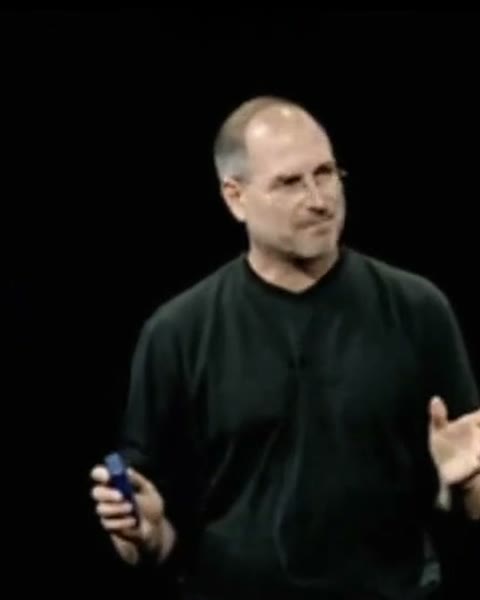
12s · 9:16 · 720p · original sound · ready in a few minutes
Also called
Names and variations for the One More Thing Keynote AI trend
Creators and tech fans refer to the One More Thing Keynote AI format under several overlapping names across short-form video feeds and meme communities.
One More Thing keynote
The full dramatic stage format behind One More Thing Keynote AI, where a presenter wraps up a talk, dims the theater lights, and steps beside a glowing dark blue slide to unveil one final surprise announcement.
One More Thing meme
The internet comedy format that pairs monumental Silicon Valley launch staging with absurdly minor everyday announcements such as leaving work early, ordering iced coffee, or finishing laundry.
Black turtleneck presenter video
A visual shorthand for classic tech founder keynotes featuring a minimalist black mock-neck sweater, jeans, a handheld slide clicker, and focused overhead spotlights.
He said it keynote reveal
A modern wave of social clips celebrating when current tech executives revive the classic closing catchphrase right before pulling back the curtain on flagship hardware.
Same category
More Funny templates
 NEW270 CR
 NEW350 CR
 NEW240 CR
 NEW220 CR
 NEW270 CR
 NEW400 CR
 NEW270 CR
 NEW220 CR
 NEW400 CR
 NEW240 CR
 NEW270 CR
 NEW140 CR
Photo tips
How to pick a One More Thing Keynote AI portrait for clean stage lighting
One More Thing Keynote AI maps your face, hair, glasses, and expression across both wide theater angles and tight black-backdrop close-ups.
- Choose a sharp, well-lit front-facing or slight three-quarter portrait where both eyes, eyebrows, hairline, and jawline are clearly visible for One More Thing Keynote AI.
- Head-and-shoulders or waist-up portraits of a single person, friend, colleague, or pet give Kling 4.0 clean facial geometry for the final clicker close-up.
- A calm, confident expression or subtle half-smile matches the poised pacing of a live keynote reveal under dark theater spotlights.
- Natural skin tones and uncropped hairlines help the dark blue and pitch-black stage lighting wrap evenly around your silhouette.
Specs
What goes in and what comes out of One More Thing Keynote AI
One portrait photo enters the One More Thing Keynote AI pipeline and renders a vertical 12-second stage reveal clip ready for social feeds.
You upload
- 1 clear portrait photo of yourself, a friend, a founder, or even a pet in the Speaker slot.
- Your face, hairstyle, glasses, and likeness replace the presenter across every stage angle.
- Zero prompt writing, timeline cutting, or green-screen masking required.
You get
- A 12-second vertical 9:16 MP4 at crisp 720p resolution rendered with Kling 4.0 Omni Reference.
- Four synchronized stage beats: blue-lit profile intro, wide "One more thing..." screen pause, red-curtain stage cut, and tight clicker close-up.
- Original clip audio merged cleanly onto the finished One More Thing Keynote AI video after rendering.
- Saved directly in My Work for instant replay, download, and sharing; credits refund automatically on failure.
| Photos | 1 portrait |
|---|---|
| Model | Kling 4.0 |
| Duration | 12 seconds |
| Picture | 720p, 9:16 |
| Audio | Original clip sound |
| File | MP4 |
| Credits | 320 per video, refunded if it fails |
Origin
Where the One More Thing keynote meme comes from
From a 1970s detective catchphrase to Silicon Valley stage lore and 2026 hardware reveals, the closing line became shorthand for theatrical hype.
From Columbo to the Macworld stage
Long before social feeds turned it into a punchline, the phrasing echoed TV detective Columbo pausing at the door with "Just one more thing..." before dropping the decisive clue. Apple co-founder Steve Jobs turned the cadence into a signature stage ritual starting at Macworld Expo in January 1999 when he introduced AirPort, later repeating it for landmark launches documented by Macworld.
Each reveal followed deliberate pacing: wrap up the main deck, thank the audience, wait for applause to settle, and then flash a stark slide reading "One more thing..." across a darkened theater. The contrast made the final announcement feel larger than everything that came before it, inspiring decades of visual parodies and Know Your Meme archives.
Why the meme surged back in 2026
Tim Cook carried the tradition forward for Apple Watch and Vision Pro, and in September 2026 new CEO John Ternus revived the catchphrase on stage to introduce the foldable iPhone Duo, sparking fresh crowd clips reported by AppleInsider and widespread TikTok edits.
Short-form creators quickly paired that high-stakes presentation staging with One More Thing Keynote AI tools, casting founders, coworkers, pets, and everyday punchlines inside the black turtleneck spotlight.
Examples
One More Thing Keynote AI reference stage timing and camera cuts
Watch the 12-second reference clip that drives One More Thing Keynote AI spotlighting, stage screen reveals, and closing close-ups.
Reference stage sequence
A 12-second 9:16 stage sequence moving from a blue-lit profile intro to wide "One more thing..." theater reveals and a final clicker close-up.
How it works
Make your One More Thing Keynote AI video in three steps
Turn any portrait into a spotlighted keynote announcement in minutes with zero editing software.
Upload one clear portrait
Select the Speaker slot above and upload one sharp, well-lit JPG, PNG, or WebP photo up to 10 MB of yourself, a friend, or a team founder.
Generate with Kling 4.0
Click Generate for 320 credits. SameVid sends a silent 12-second stage reference to Kling 4.0 Omni Reference so your likeness replaces the speaker cleanly.
Download and drop your punchline
Your finished 720p MP4 arrives in My Work with the original audio merged back in. Add your own punchline caption when posting to Shorts, Reels, or X.
Photos: JPG, PNG, WebP, up to 20 MB.
FAQ
One More Thing Keynote AI FAQ
How many photos does One More Thing Keynote AI need?
One More Thing Keynote AI only needs one clear portrait photo. Upload a front-facing or slight three-quarter shot into the Speaker slot, and Kling 4.0 maps that person across all 12 seconds.
Which AI model powers One More Thing Keynote AI?
One More Thing Keynote AI runs on Kling 4.0 Omni Reference using a silent 12-second reference clip for the theater spotlights, camera cuts, and giant screen layout while anchoring the presenter to your photo.
What are the video length, resolution, and aspect ratio?
Every One More Thing Keynote AI render outputs a 12-second vertical 9:16 MP4 at 720p resolution, ready for TikTok, Instagram Reels, YouTube Shorts, and vertical X feeds without extra cropping.
Does the generated video include audio?
Yes. Kling 4.0 receives the silent visual reference for crisp stage motion, and SameVid automatically merges the original clip audio onto your finished 12-second MP4.
How many credits does one video cost, and what if it fails?
Each 12-second One More Thing Keynote AI generation costs 320 credits based on clip duration. If any render fails to complete, all 320 credits refund automatically to your balance.
Who works best in this meme format, and what templates pair well?
Founders teasing launches, coworkers announcing lunch, students, friends, and pets all fit well. Pair it with Funny AI Video Templates, Jensen Huang Worth It AI, or Microsoft Outage Meme.
Do I need to write prompts or add my own captions?
No prompt writing or video editor is required. One More Thing Keynote AI outputs a clean stage clip free of overlaid subtitles so you can drop any custom punchline caption in your social app.
Does the top player show a generated video or the reference clip?
The top player previews the 12-second reference clip so you can inspect the spotlighting, stage screen reveal, and sound before uploading your photo to render your own One More Thing Keynote AI video.
Keep scrolling
More viral AI video trends
 NEW380 CR
 NEW220 CR
 NEW220 CR
 NEW350 CR
 NEW270 CR
 NEW380 CR
 NEW240 CR
 NEW320 CR
 NEW400 CR
 NEW300 CR
 NEW140 CR
 NEW400 CR