
Dance · New
Stop the Wedding Trend Video Generator
Stop the Wedding Trend AI Video Generator turns 1 photo into a 14-second seated hand dance. Kling 4.0 maps your face and outfit onto every wink and beat, delivering a 720p 9:16 vertical MP4 with synced music for 380 credits.
Stop the Wedding Trend · 14s · 9:16
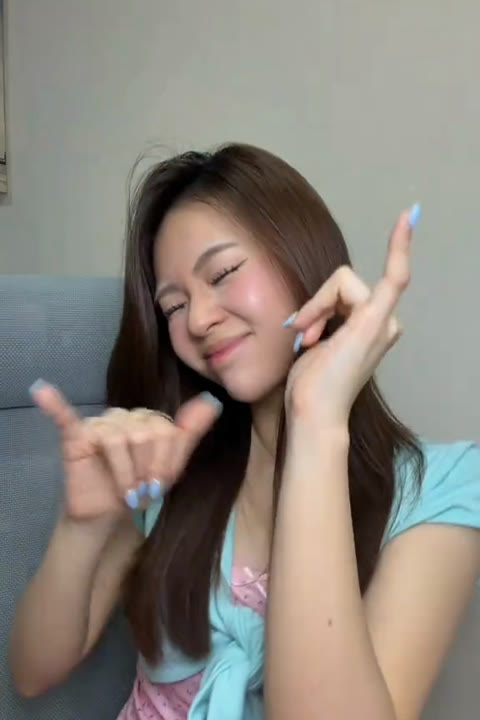
14s · 9:16 · 720p · original sound · ready in a few minutes
The Moves
Four beats inside the 14-second Stop the Wedding Trend dance
Kling 4.0 Video Edit transfers every wink, finger trace, and wrist snap from the reference clip onto your uploaded portrait across 14 seconds.
0.0s – 3.5s · Opening Wink & Crossed-Arm Rhythm
The routine starts framed waist-up in a cozy chair against a clean cream wall. Your subject opens with a playful wink and relaxed smile while crossing both forearms in front of the chest in lockstep with the upbeat remix intro.
3.5s – 7.0s · Chest Tap & Chin-Line Gesture
As the vocal build hits, one hand closes lightly near the chin while the shoulders bounce gently with each snare. Facial expressions shift cleanly from cheeky grin to dramatic lip-sync timing while keeping your identity crisp and consistent.
7.0s – 10.5s · Finger-Point Drop & Chorus Accent
Right on the chorus beat drop, the raised hand snaps forward toward the lens and circles across the cheek with crisp finger articulation, keeping both hands sharp and cleanly separated against the neutral wall.
10.5s – 14.0s · Dual-Hand Framing & Closing Head Tilt
In the final bars, both hands rise together on either side of the face for rhythmic finger snaps before settling into a confident head tilt and camera-ready smile as the track resolves.
Same category
More Dance templates
 NEW350 CR
 NEW380 CR
 NEW320 CR
 NEW400 CR
 NEW400 CR
 NEW400 CR
 NEW270 CR
 NEW400 CR
 NEW400 CR
 NEW400 CR
 NEW270 CR
 NEW400 CR
Origin
How Ashe’s “Stop the Wedding!” became a global dance & meme trend
From a theatrical 2026 pop single about relationship red flags to throwback family memes and viral hand-dance choreography.
The 2026 Song That Sparked the Wave
The Stop the Wedding Trend grew out of American singer-songwriter Ashe’s single "Stop the Wedding!", released in August 2026 ahead of her album The Girl of Your Dreams. Inspired by reflecting on her own first marriage during a happier second wedding, the track pairs ABBA-style theatrical drama with sharp storytelling about spotting warning signs early.
Within weeks of release, the audio surged past 125,000 TikTok videos and 94 million Spotify streams. Creators first used the chorus over relationship red-flag checklists and breakup reflections, turning the title into internet shorthand for walking away from the wrong match.
From Throwback Memes to Viral Dance Challenges
By November 2026, a second wave took over feeds across Latin America, Southeast Asia, and English-speaking TikTok. While one branch paired vintage parents’ wedding photos with knowing captions, dance creators turned the catchy rhythm and remixed club beats into a clean, repeatable seated hand routine known in dance tags as "dc baru stop the wedding."
Because the seated waist-up hand dance needs zero wide studio space or complicated props, it quickly became one of the cleanest formats to recreate with AI video generation—turning any portrait into a ready-to-post 14-second clip with synced sound.
How It Works
Make your Stop the Wedding Trend video in three quick steps
Turn a single portrait into the full 14-second hand dance right in your browser—skipping manual timelines or prompt writing.
Upload one clear portrait photo
Drop one sharp, front-facing JPG, PNG, or WebP photo up to 10 MB into the Dancer slot. Well-lit upper-body portraits or crisp selfies give Kling 4.0 maximum detail for facial expressions and outfits.
Launch Kling 4.0 Video Edit
Click Generate to start the 14-second render for 380 credits. The server sends our clean silent reference video alongside your image so Kling 4.0 preserves the seated framing, plain wall, and every hand beat.
Download your 720p MP4 with synced music
Wait a few minutes while SameVid renders the 9:16 clip and merges the upbeat Stop the Wedding remix audio automatically. Save the finished MP4 from My Work and share it directly to your feed.
Photos: JPG, PNG, WebP, up to 20 MB.
Who to Put In
Best subjects to star in the Stop the Wedding Trend
One crisp photo is enough to cast yourself, a friend, a fictional character, or an illustrated persona into the 14-second dance.
Yourself in Casual or Dressy Outfits
Use a bright selfie, brunch snapshot, or dressed-up wedding-guest portrait. Watching your own photo hit every wink and finger snap on beat makes an effortless reaction post.
Best Friends & Wedding Party Crew
With a friend’s permission, drop in a portrait of the maid of honor, best man, or group-chat favorite for bachelorette banter and inside-joke replies.
Fictional Characters & Cozy Avatars
Fans love pairing the "Stop the Wedding!" anthem with dramatic movie, book, or anime characters who definitely deserved a warning before walking down the aisle.
Retro Throwback & Vintage Portraits
Upload a sharp scanned portrait from decades past to bring classic hairstyles and retro fashion straight into a modern 2026 hand-dance edit.
Ready to Post
Caption ideas inspired by real Stop the Wedding Trend posts
Copy a trending caption below or tweak it to match your photo’s storyline before sharing.
- “This is the only thing I think about whenever I hear Stop the Wedding 💍”
- “Sending this to anyone who ignored the earliest red flag 😅 #stopthewedding”
- “POV: your friends trying to hype you up on the way out #stoptheweddingtrend”
- “Dc baru stop the wedding—one photo and zero choreography practice needed 🤙🏻”
- “Calling off bad plans and keeping the good vibes only 🤍 #hindsight”
- “Wait for the final head tilt at the end of the beat drop 👀 #weddingtok”
- Pair dramatic relationship or movie-couple captions with a deadpan portrait for instant comedy contrast.
- Add #stopthewedding and #stoptheweddingtrend so viewers browsing the sound recognize the format immediately.
- Keep on-screen text above the chest line so both hands stay fully visible throughout the choreography.
Specs & Output
What goes in and what your Stop the Wedding Trend video delivers
Every Stop the Wedding Trend render follows fixed 720p portrait parameters so your generated clip matches short-form feed standards cleanly.
You upload
- 1 clear front-facing portrait or waist-up photo
- Centered head and shoulders with even natural lighting
- Zero prompt writing, timeline trimming, or audio syncing
You get
- 14-second 9:16 vertical HD MP4 ready for TikTok, Reels, and Shorts
- Full upper-body hand choreography, winks, and lip-sync timing preserved
- Synced Stop the Wedding remix track automatically merged into the file
| Photos | 1 portrait photo |
|---|---|
| Model | Kling 4.0 Video Edit |
| Duration | 14 seconds |
| Picture | 720p, 9:16 vertical |
| Audio | Original remix track included |
| File | Watermark-free MP4 |
| Credits | 380 per video, refunded if it fails |
Ready to make your Stop the Wedding Trend video?
Upload one photo above and turn it into a 14-second 720p vertical dance clip with sound for 380 credits.
FAQ
Stop the Wedding Trend FAQ
How does the Stop the Wedding Trend Video Generator work?
The Stop the Wedding Trend Video Generator pairs 1 uploaded portrait photo with our 14-second seated hand-dance reference inside Kling 4.0 Video Edit. It transfers every gesture, wink, and beat onto your character before merging the music track automatically.
What kind of photo gives the best results?
A sharp, front-facing shoulders-up or waist-up portrait in even lighting gives the Stop the Wedding Trend template its cleanest likeness. Upload a clear JPG, PNG, or WebP file up to 10 MB so Kling 4.0 captures eyes, hair, and outfit details accurately.
Does the finished video include music and sound?
Every Stop the Wedding Trend export includes the synced remix soundtrack merged automatically into the final 720p MP4. While Kling 4.0 follows a silent visual reference stream for tight motion, SameVid remuxes the audio track before delivery to My Work.
How is this different from static caption meme makers?
Stop the Wedding Trend on SameVid generates a real 14-second animated 9:16 dance video, whereas static meme makers only overlay text on a frozen JPEG. Your single photo performs full facial expressions and hand choreography with synced sound.
What are the output specs and credit cost?
One Stop the Wedding Trend generation outputs a watermark-free 14-second 720p vertical 9:16 MP4 for 380 credits. Credits are refunded automatically whenever a task stops before finishing.
Can I use fictional characters or vintage portraits?
Anime characters, game avatars, illustrated personas, and clear vintage portraits all animate cleanly in the Stop the Wedding Trend dance. The seated upper-body framing keeps your subject close to the lens across all 14 seconds.
Keep scrolling
More viral AI video trends
 NEW220–430 CR
 NEW400 CR
 NEW270 CR
 NEW140 CR
 NEW270 CR
 NEW240 CR
 NEW300 CR
 NEW140 CR
 NEW270 CR
 NEW350 CR
 NEW400 CR
 NEW240 CR