
Dance · Trending
Jim Carrey Pointing Dance AI Video Generator
Upload one portrait and put your person into the fast, funny pointing routine. SameVid AI keeps the grey-kitchen camera rhythm while your performer walks in, points at the lens, throws up an open palm and lands the final dramatic turn.
Jim Carrey Pointing Dance AI · 15s · 9:16
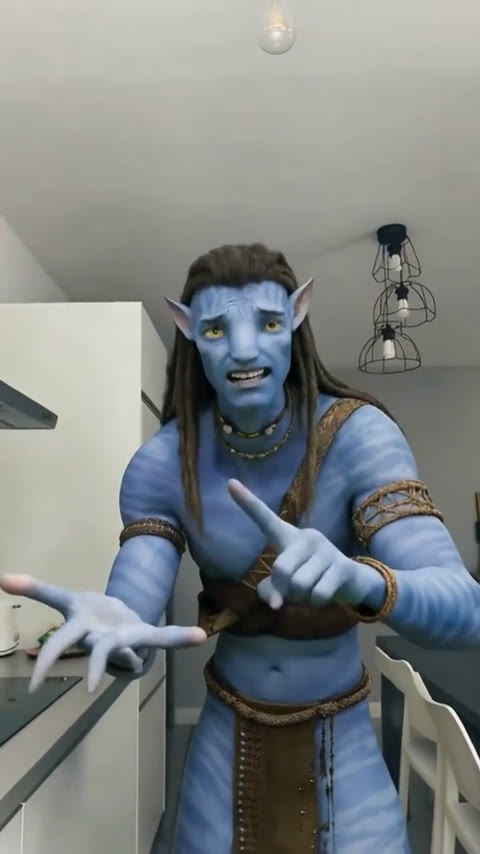
15s · 9:16 · 720p · original sound · ready in a few minutes
The routine
The pointing dance, beat by beat
The humour comes from playing every hand move with total commitment. Your photo becomes the only performer from the opening walk-in to the last close-up.
Walk in with a look
The performer enters the bright grey kitchen in a medium shot, faces the lens and sets up the joke with a big, expressive face. The opening keeps enough of the body in view to make the next gestures read clearly.
Point straight at the camera
Both index fingers take turns leading the rhythm. Each point lands directly toward the viewer, then pulls back into the next accusation-like flourish. This is the signature beat that makes the clip instantly recognisable in a feed.
Push the palm into the frame
An open hand comes close to the lens for a bold foreground moment. The camera stays in the same kitchen position, so the sudden oversized palm gives the routine its quick burst of cartoon energy.
Throw the hand past the face
The performer flicks a hand out beside the face, keeping the exaggerated expression alive. It feels like a tiny argument acted entirely through eyebrows, shoulders and hands.
Turn away, then return
A short step back and theatrical turn gives the final pointing gesture room to land. The last close-up leaves a clean reaction frame that works well when friends replay the video or share it in a group chat.
Same category
More Dance templates
 NEW350 CR
 NEW380 CR
 NEW320 CR
 NEW400 CR
 NEW400 CR
 NEW400 CR
 NEW270 CR
 NEW400 CR
 NEW400 CR
 NEW400 CR
 NEW270 CR
 NEW400 CR
Photo tips
Choose a portrait that keeps every gesture clear
The reference moves between a medium shot and close hand-to-lens framing, so a clear portrait gives the model the strongest identity details to carry through the whole routine.
- Use one person in the photo, facing the camera with both eyes visible.
- Include the head, shoulders and as much of the torso as possible so the opening medium shot has a natural body shape.
- Choose even light that keeps the face, hair and clothing colours easy to see.
- Pick a photo where the person has a relaxed expression; the performance supplies the big reactions.
- Keep hands away from the face in the source photo so the pointing and palm beats have clean starting details.
Your video
One portrait in, a complete pointing performance out
The template pairs one clear portrait with the fixed pointing routine and returns a ready-to-share vertical MP4 for 400 credits.
You upload
- One portrait of one person
- JPG, PNG or WebP, at least 300 pixels on each side, up to 20 MB
- A clear face, visible hair and upper-body details for the close camera moments
You get
- A 15-second vertical MP4 at 720p
- One performer following the complete finger-pointing routine
- The grey kitchen, close camera timing and hand-forward framing from the reference clip
- The original reference track merged under the finished video
- A saved result in My Work for replaying, downloading and sharing
| Photos | 1 |
|---|---|
| Model | Kling 4.0 video edit |
| Duration | 15 seconds |
| Picture | 720p, 9:16 vertical |
| Scene | Grey home kitchen |
| Routine | Point, palm, turn and final close-up |
| File | MP4 |
| Credits | 400 per video, refunded if it fails |
From TikTok
A creator take on the pointing routine
This clean one-person example captures the full sequence in a single kitchen performance.
@vifunaiapp_
A full 15-second take shows the walk-in, alternating finger points, near-lens palm and final turn. It is the reference used for this template’s camera timing and movement.
How it works
Make a Jim Carrey Pointing Dance in three steps
Start with one portrait, generate the complete routine and take the finished reaction video wherever you share short clips.
Add one clear portrait
Choose a front-facing photo with the person’s face, hair and upper body visible. This gives the Jim Carrey Pointing Dance AI template enough detail for both the opening medium shot and the close hand-to-lens moments.
Generate the pointing routine
Tap Generate to place your performer into the fixed walk-in, alternating-point, palm and turn sequence. The complete 15-second performance uses 400 credits.
Download your finished reaction
Your vertical MP4 appears in My Work with the original reference track merged beneath the performance. Replay it, download it or share it as a direct reaction in your favourite short-video feed.
Photos: JPG, PNG, WebP, up to 20 MB.
The format
What makes this pointing dance its own routine
This version is built around a fixed set of camera-facing finger points, giving one portrait a focused fifteen-second reaction performance.
A one-person kitchen performance
The Jim Carrey Pointing Dance AI reference keeps one performer in the same grey kitchen from start to finish. That continuous setup lets your portrait carry the expression, body language and hand gestures through a complete reaction instead of appearing in a set of disconnected clips.
The source example is a dated TikTok creator video from 2026-10-30. It supplies the movement, framing and pacing for this template, while the generated result uses the identity and clothing from the photo you choose.
A focused sequence of finger-forward beats
Jim Carrey Pointing Dance AI centres on alternating index-finger points toward the lens, an open palm pushed into the foreground and a final turn back to camera. Each beat is visible in the full reference take, so the routine has a clear beginning, escalation and punchline.
The related Bad Times Dance template uses its own hand-to-forehead and two-palms choreography. This pointing template is for a sharper, camera-directed reaction built around one performer calling out the viewer.
Built for a quick, personal reply
A close eyeline and the near-lens palm make the finished video read like a direct reply. Use a friend’s approved portrait for a group-chat verdict, a birthday callout or the moment a project finally ships; the gesture sequence provides the comic energy while the chosen person makes the result personal.
FAQ
Jim Carrey Pointing Dance AI FAQ
What is the Jim Carrey Pointing Dance AI video?
It is a 15-second vertical performance built around a fast pointing, open-palm and turn-away routine in a grey kitchen. Your uploaded portrait becomes the one performer doing every gesture.
How many photos does this template use?
This template uses one portrait for one performer. A clear photo with the face and upper body visible gives the model the details it needs for both the medium shot and the close-up hand moments.
What happens after I upload my photo?
SameVid AI applies your person to the complete 15-second pointing routine, preserves the scene and camera rhythm, then saves the finished MP4 in My Work. Each generation uses 400 credits.
What does the performer do in the video?
The performer walks into the kitchen, alternates direct finger points toward the camera, brings an open palm close to the lens, throws a hand beside the face and ends with a dramatic turn and return.
Which photo works best?
Choose a bright, sharp portrait of one person facing forward. A visible head, shoulders and torso give the result a natural transition from the wider opening to the expressive final close-up.
What video format will I receive?
You receive a 15-second, 720p, 9:16 vertical MP4. The finished clip includes the reference track and is ready for TikTok, Instagram Reels, YouTube Shorts or a group chat.
Why is the hand so close to the camera?
The near-lens palm is a defining visual beat in this routine. It creates a quick scale change, makes the reaction feel direct and gives the video a memorable frame for sharing.
Which dance template should I try next?
For another expressive one-photo routine, try the Bad Times Dance template. For a music-led solo performance, explore the Thriller Dance AI template.
Keep scrolling
More viral AI video trends
 NEW400 CR
 NEW270 CR
 NEW400 CR
 NEW220 CR
 NEW380 CR
 NEW220–430 CR
 NEW270 CR
 NEW240 CR
 NEW300 CR
 NEW140 CR
 NEW270 CR
 NEW350 CR